

A stocktake is the physical count and verification of inventory held in your warehouse against your system records. It’s one of the most critical operational activities in any warehouse, yet it remains one of the most error-prone, and time-consuming. Without a structured approach, a stocktake can take weeks, disrupt picking operations, and still reveal discrepancies that haunt you for months.
In this guide, we’ll walk through how to do a stocktake properly: the planning phase, the execution, the reconciliation, and the technology that stops you from ever doing it manually again. Whether you’re a 3PL managing stock for multiple clients, a distributor running a single large warehouse, or a retailer with goods in multiple locations, the principles are the same, and the stakes are equally high.
Why stocktaking matters
Inventory accuracy is the foundation of warehouse operations. When your system stock count doesn’t match the physical count on the floor, everything breaks down: you might oversell products you don’t actually have, pick wrong items for orders, invoice clients for stock you can’t find, or miss recalls that depend on knowing exactly where a product is.
For 3PLs, the problem is magnified. You’re managing stock for multiple clients, each with different products, SKUs, lot numbers, and expiration dates. A single stocktake error can end up in a billing dispute, a client complaint, or worse, a retention threat. Yet most 3PLs still rely on spreadsheet-based stocktake processes: picking lists printed on paper, counts written by hand, data re-keyed manually, and discrepancies investigated days later when people’s memories are fuzzy.
Le gestion des systèmes d'entrepôt sector has evolved to solve this, but many warehouses haven’t caught up. The companies that do structured, repeatable stocktakes, ideally backed by software, enjoy year-round accuracy and avoid the operational chaos that follows a poor count.
What is the process of a stocktake?
A stocktake follows a repeatable cycle, regardless of warehouse size or industry. Understanding each phase prevents common failure points.
1. Planning and preparation (1–2 weeks before)
Start by deciding your stocktake approach. There are two main methods:
- Full physical stocktake: Every SKU, every location, counted once. Takes 2–10 days depending on warehouse size. Used quarterly or annually, or after major discrepancies.
- Cycle counting: A small subset of inventory counted daily or weekly throughout the year. With consistent discipline, cycle counting can replace a full stocktake entirely and maintain accuracy to within 1–2%.
Most modern warehouses combine both: frequent cycle counting to catch drift early, plus an annual full stocktake as a safety check. Cycle counting has a volume of around 150 searches monthly and is becoming the standard in faster-moving operations because it distributes the workload and avoids the shutdown cost.
Before you begin, gather these inputs:
- System data freeze: Lock your WMS at a known timestamp. No receipts, no picks, no adjustments during the count.
- Stock list export: Print or display a live count-by-location list showing expected quantities, lot numbers, and serial numbers (if applicable).
- Staffing plan: Assign counts to teams, define zones, and establish a quality check process (spot-check 5–10% of counts for data-entry errors).
- Equipment: Barcode scanners, counting sheets or mobile devices, and a reconciliation area.
This preparation phase is where many warehouses stumble. A poorly thought-out count sequence leads to double-counting, missing locations, or people left idle waiting for instructions. Clear zones, clear ownership, and clear handoffs prevent chaos.
2. Execution: Counting and recording
On the day of the stocktake, follow this sequence:
- Zone assignment: Divide the warehouse into zones (e.g. aisle A, aisle B, chilled storage, overstock). Assign a team or pair to each zone.
- Physical count: Count every item in your zone. For open cartons or mixed pallets, count individual units. For sealed cases where you know the pack size, count cases and multiply.
- Record the count: Using a barcode scanner or count sheet, record the SKU and quantity against the location. Double-check suspicious counts, a location showing 100 units when the system says 20 is a red flag.
- Mark and move: Mark each location as counted (chalk, tape, or a scanner flag). This prevents recounting the same location.
- Quality check: A second person spot-checks 5–10% of counts before they’re locked in. Catches data-entry errors and balayage mistakes before they become reconciliation headaches.
The best way to do a stocktake is to minimise system downtime. If you can count while normal operations continue, by freezing the count at a specific time and having picking operations work from a separate batch, do it. This prevents the operational gridlock that turns a 2-day count into a week-long pause.
3. Reconciliation: Finding the discrepancies
Once counts are complete, the real work begins. Compare physical counts to system records:
- Variance report: Generate a report of every SKU where the physical count doesn’t match the system. Sort by value (cost of the discrepancy) or by percentage (largest count error).
- Investigate: For significant variances, trace them: Did a goods-in receipt fail to be entered? Did a pick miss a system adjustment? Is there a labelling error causing confusion between similar SKUs? Is there a theft or damage incident?
- Adjust: Once you understand the variance, adjust the system to match the physical count. Document the reason for each adjustment (e.g. “goods-in delay on PO#12345”, “damaged stock found in zone C”).
Don’t adjust blindly. Every variance is a signal that something in your process broke. Finding the root cause, and fixing it, is what stops the same error happening next month.
How to do a stocktake audit: controls and compliance
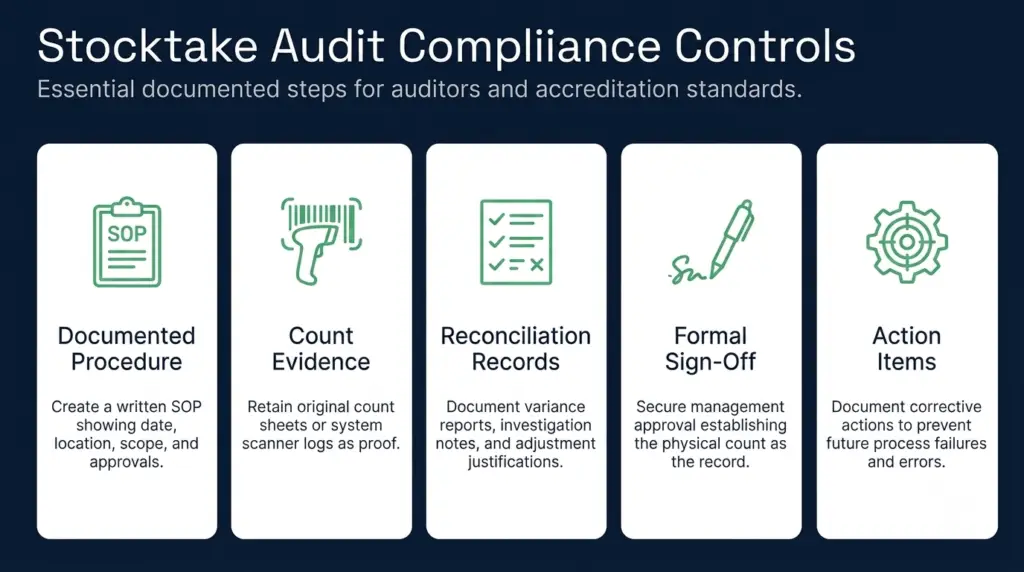
If you’re operating under a food standard (BRCGS), a retailer code of practice, or ISO accreditation, your stocktake must include documented controls. Here’s what auditors expect:
- Documented procedure: A written stocktake SOP (Standard Operating Procedure) showing the date, location, scope, and approval chain. Auditors want to see that this wasn’t ad-hoc.
- Count evidence: Retain the original count sheets or scanner logs showing who counted what, when, and the quantities recorded. Most WMS platforms maintain an audit trail automatically.
- Reconciliation records: The variance report, the investigation notes, and the adjustment justifications. These prove you found discrepancies and understood why they happened.
- Sign-off: Approval from warehouse management and finance that the physical count is now the system of record.
- Action items: If the stocktake revealed process failures (missed goods-in, pick errors, labelling problems), document what you’ll do to prevent them recurring.
Purpose-built systems like meilleur logiciel de gestion d'entrepôt designed for 3PLs and distributors capture all of this automatically. Clarus, for example, maintains a complete audit trail of every goods movement, so when you find a discrepancy, the investigation is a matter of opening a transaction log, not rummaging through spreadsheets and asking people what they remember. For Les Campeys de Selby, a food and beverage business, this audit trail meant sub-5-minute product recalls and BRC Double-A accreditation — because the system could prove exactly where every batch had been.
How long does it take to do a stocktake?
The answer depends on your warehouse size, complexity, and the method you choose.
Full physical stocktake: A small 5,000-SKU warehouse with good organisation might take 2–3 days. A large 50,000-SKU operation with mixed products, lots, and serials can take 10–14 days. The largest multi-site operations sometimes schedule them quarterly in rotation to avoid a single massive shutdown.
Cycle counting: A daily cycle count of 100–200 SKUs takes 2–4 hours and can be woven into normal warehouse routines. It’s faster because you’re not freezing operations, and you’re working with smaller, manageable subsets.
Le stock take guide from Simply Business suggests that warehouses using barcode scanning and real-time reconciliation see a 30–50% reduction in count time versus manual, paper-based methods. The time savings come from two sources: faster data capture (no re-keying) and fewer discrepancies to investigate (because the count is cleaner).
One measurement worth tracking is “count accuracy rate”, the percentage of locations that need no adjustment. A manual stocktake typically achieves 95–98% accuracy. Warehouses using automated cycle counting with scan verification often reach 99%+. That extra 1–2% accuracy prevents the disputes, recalls, and re-counts that eat weeks of admin time later.
Advantages of stocktaking in practice
Beyond compliance, regular stocktaking offers tangible operational benefits:
- Catch process failures early: A stocktake variance tells you if your goods-in process is broken, your pick lists are error-prone, or your labels are confusing. Fix these before they cost you a major customer complaint.
- Reduce facturation disputes: For 3PLs, system accuracy is the difference between invoicing what you actually handled and invoicing what you hope you handled. JODA Freight, a UK 3PL, brought stock accuracy from the low 90s to 99.8% after implementing a real-time WMS with scan verification. That eliminated months of end-of-month reconciliation calls with clients.
- Enable scalability: If your stocktake takes weeks and ties up half your warehouse team, you can’t scale volume. When KATEM Logistics moved to a system with automated cycle counting and task-based picking, they scaled monthly picking volumes 10x, because stocktake management went from a quarterly panic to a daily 30-minute activity.
- Protect against shrinkage: Regular counts catch unexpected losses, theft, damage, evaporation in cold storage, quickly, rather than discovering a 5% shortfall in your annual audit.
The advantages of stocktaking are clearest when you see what happens without it: system stock drifts further and further from reality, clients lose confidence in your stock counts, picking errors increase because pickers can’t find items, billing becomes a negotiation rather than a fact, and eventually you’re forced into an emergency stocktake that disrupts everything.
Technology that stops manual stocktakes
If you’re still managing stocktakes on paper or in spreadsheets, you’re leaving efficiency on the table. Modern warehouse systems handle the entire stocktake cycle:
- Automated data freeze: Lock system stock at a specific timestamp so there’s a clean comparison point.
- Mobile scan workflows: Count staff use code-barres scanners or mobile devices to record counts in real time, with built-in validation rules that catch obvious errors (e.g. “Are you sure you counted 1,000 units of this SKU when the system shows 50?”).
- Real-time reconciliation: Compare physical counts to system records as they come in, not days later after data re-keying.
- Root-cause investigation: The system shows you the transaction history for any discrepancy, when it arrived, who moved it, which pick or receipt touched it. Investigation minutes instead of hours.
- Automated variance reporting: See discrepancies sorted by value, percentage, or location. Focus your investigation effort on the biggest impacts.
- Journal d'audit : Every count, adjustment, and investigation is logged and time-stamped. Ready for auditors.
For goods inwards operations especially, modern WMS platforms eliminate the traditional goods-in backlog that causes so many stocktake variances. When goods are scanned and allocated to stock (or to client holds) immediately, the inventory record stays current, and stocktake discrepancies drop dramatically.
Cycle counting is where this technology has the most impact. Instead of waiting for an annual stocktake, you maintain accuracy year-round by counting 200 SKUs daily, adjusting immediately, and investigating the variance on the day it happens, when people remember what happened and can walk to the location. This method has grown from a specialist practice to a standard for any warehouse serious about accuracy.
Stocktake best practices and next steps
Whether you’re planning your first formal stocktake or trying to improve an annual ritual:
- Define a repeatable process: Don’t reinvent it each year. A documented SOP ensures consistency and helps new team members understand what’s expected.
- Invest in technology early: A barcode scanner and a WMS that supports stocktake workflows will pay for itself in the first count through faster execution and fewer errors.
- Consider cycle counting: If you’re running a large or fast-moving operation, move away from annual stocktakes toward daily cycle counting. The stocktaking guide from Unleashed Software outlines how this scales, and the evidence is clear: daily counting maintains 99%+ accuracy while reducing the disruption of a full stocktake.
- Track metrics that matter: Don’t just count; measure: accuracy percentage, time per SKU counted, variance investigation time, and root causes of discrepancies. These metrics show you where to focus process improvements.
- Plan for multi-site scale: If you’re running multiple warehouses, use a central system that can run stocktakes in parallel, consolidate results, and spot patterns (e.g. “all accuracy issues are in the chilled zone” or “all variances are within 2 hours of shift change”).
The cost of warehousing includes overhead that most businesses try to minimise, but stocktake downtime is a cost that’s easy to reduce with the right approach. Switching from a 2-week full stocktake to daily cycle counting, supported by warehouse cost data and a purpose-built system, typically cuts stocktake-related costs by 60–80%.
Discutez avec un expert en entreposage
Si vous êtes en train d'évaluer vos options et que vous souhaitez découvrir comment fonctionne concrètement un progiciel de gestion d'entrepôt (WMS) spécialement conçu à cet effet, n'hésitez pas à contacter Clarus. Nous collaborons avec des prestataires logistiques tiers (3PL) et des distributeurs à travers tout le Royaume-Uni pour mettre en place un progiciel de gestion d'entrepôt qui s'adapte à votre mode de fonctionnement, et non l'inverse.
Contactez notre équipe pour discuter de vos besoins.