

When you’re evaluating a warehouse management system, you’re not just buying software, you’re choosing the operational backbone of your business. A poor choice locks you into years of workarounds, manual billing reconciliation, and angry clients because nobody can see real-time stock levels. A good one cuts facturering admin by 80%, improves stock accuracy to 99%+, and lets your team focus on growth instead of data entry.
This guide walks you through how to compare warehouse management systems fairly, what criteria actually matter, and how to build a shortlist that fits the way you operate. Whether you’re a 3PL, food & beverage distributor, or wholesale operation, the comparison framework is the same, it’s just the weighting of criteria that changes.
What is a warehouse management system and why does the comparison matter?
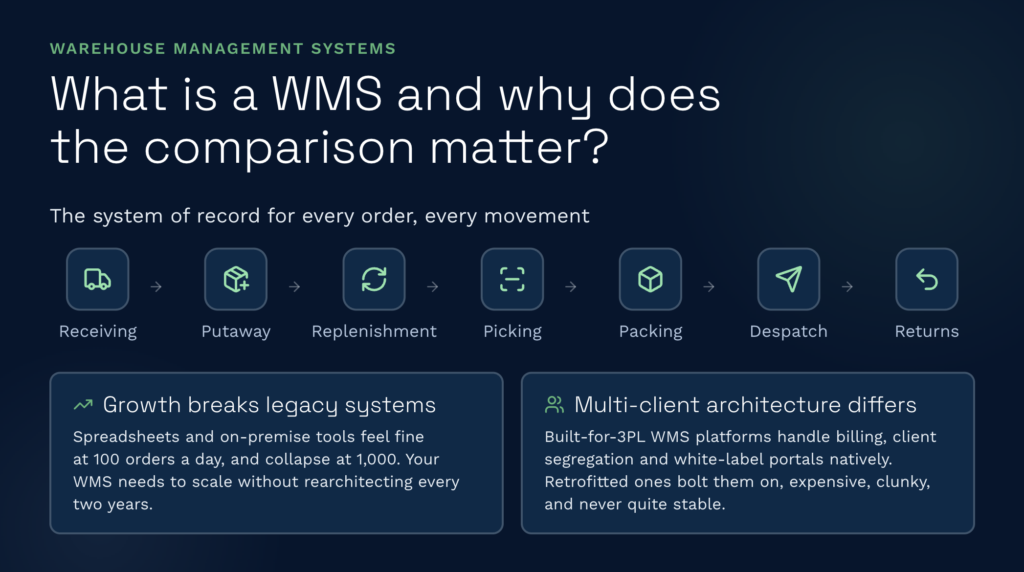
A warehouse system management solution handles everything that moves through your warehouse: receiving, putaway, stock replenishment, picking, packing, despatch, and returns. It’s the system of record for inventory location, quantity, and movement.
The reason comparison matters is that legacy systems, whether on-premise WMS, custom-built platforms, or spreadsheets, create operational bottlenecks that only reveal themselves under load. At 100 orders a day, a manual system feels fine. At 1,000 orders a day, it collapses. The WMS you choose today needs to grow with you without rearchitecting every two years.
Second, WMS vendors differ profoundly in how they think about multi-client operations. A best-of-breed WMS built for 3PLs from the ground up handles billing automation, client segregation, and white-label portals as native features. A WMS retrofitted from a single-client architecture treats these as add-ons, expensive, clunky, and never quite stable. That architectural difference drives your implementation timeline, your ongoing admin burden, and ultimately whether you can scale profitably.
Cloud vs on-premise: the architecture question
This is the first decision point and it matters more than most people think.
Cloud-native WMS (serverless, always-on): Your data lives in the cloud, you access it via a browser, and the vendor handles all updates, patches, and infrastructure. No version upgrades to plan, no servers to maintain, always on the latest release. Examples include cloud-based solutions on Capterra. Cost is typically monthly rolling, often £1,000–£3,000/month depending on transaction volume.
Advantages: fast deployment (4–8 weeks typical), lower upfront capital, automatic backups, built-in redundancy, no IT overhead, clients can access stock data via a live portal without VPN gymnastics, easier to add features without downtime.
Disadvantages: less customisation (you fit the software, not the other way around), ongoing subscription cost, internet dependency (though most operators run redundant connections), less obvious to non-technical stakeholders that you’re being kept current.
On-premise WMS (servers you own or lease): The software runs on your hardware, either in your warehouse or your data centre. You control every update, every configuration, every backup, and you own all the operational overhead. Examples include legacy platforms like Indigo WMS or custom-built systems.
Advantages: full control, potentially customisable to extreme specificity, no per-transaction fees (usually), perceived lower long-term cost if you already have IT infrastructure.
Disadvantages: 12–18 month implementation timelines, requires dedicated IT support (knowledge transfer risk when that person leaves), you bear all patch/upgrade risk, clients cannot access your system directly (they email, you reply), adding new features requires version upgrades with downtime windows, scaling to new sites means new servers.
For 3PLs and growth-stage distributors, cloud almost always wins. The speed, operational simplicity, and ability to give clients live access are worth far more than the perceived control of on-premise ownership.
Best-of-breed vs ERP module: fit and flexibility
Some organisations are tempted to handle warehouse management via an ERP module, a feature bolted onto their existing Sage, Microsoft Dynamics, or SAP licence. It sounds sensible: one vendor, one database, unified reporting. It almost never works well in practice.
ERP WMS modules (Sage 200, Dynamics, SAP, QuickBooks): The WMS functionality is a feature inside a general accounting and operations system. Good for very simple linear warehouses (one product, one location, in-and-out). Poor for anything complex.
Reality check: The ERP vendor optimised for GL posting, not for optimal picking paths. Putaway logic is basic. Multi-client segregation doesn’t exist (you have to build it manually with cost centres or locations, which gets messy fast). Billing integration means the WMS sends data to the ERP and the ERP does the invoice, creating a two-step process and an opportunity for reconciliation errors. Client visibility? You’d have to expose them to the ERP, which is a security and UX nightmare. Integration with carriers, ecommerce platforms, automated picking equipment, the ERP module usually can’t do these without expensive custom code.
Timeline to regret: 6–18 months, at which point you’ve already spent a fortune on implementation and customisation and now you’re shopping for a proper WMS anyway.
Best-of-breed WMS (dedicated platforms like Clarus, Mintsoft, Snapfulfil): Built from scratch to solve warehouse problems. Multi-client is native. Billing automation is native. Carrier integrations are out-of-the-box. Client portals are built-in, not bolted-on.
Trade-off: You integrate the WMS with your ERP (or QuickBooks, or Xero) via API or data sync, not a unified database. That sounds worse than it is, the WMS is the source of truth for inventory and warehouse operations, and data flows to the ERP once a day or on transaction. Cleaner, faster, more reliable than retrofitting WMS logic into an accounting system.
For 3PLs, this is not a trade-off, it’s an absolute requirement. You cannot manage a multi-client warehouse from an ERP module. You also cannot scale picking and packing operations intelligently, handle billing automation, or give clients real-time visibility. A purpose-built best warehouse management software is the only sensible choice.
Core vs common features: what matters most
Every WMS promises the same things: real-time inventory, pick routing, barcode scanning. The differentiation is in the detail.
Core features (non-negotiable for 3PL)
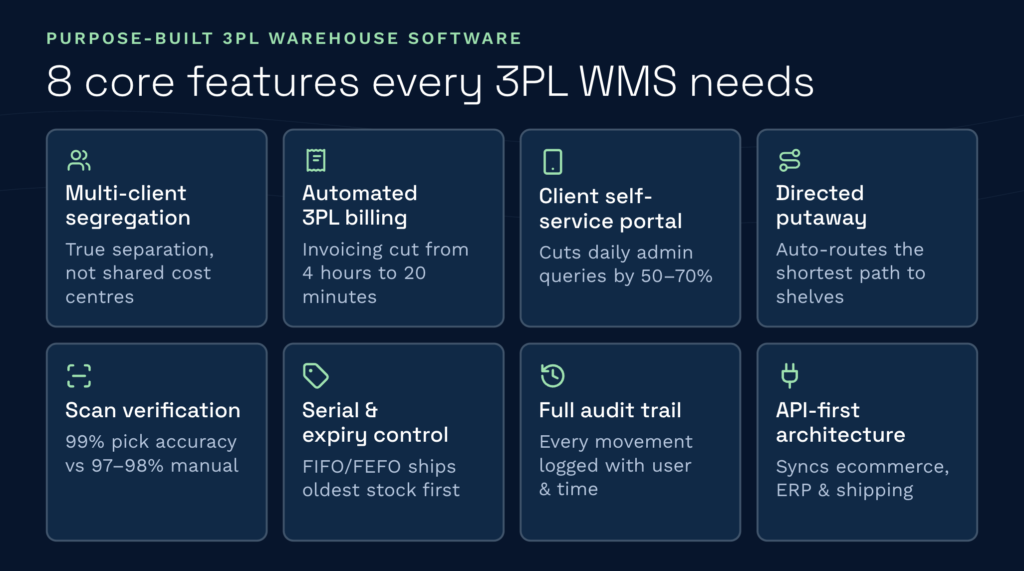
- Multi-client stock segregation: Each client’s inventory, reporting, and billing isolated within one warehouse. Not a virtual partition, true separation. This is where most retrofitted systems fail. Legacy systems treat all inventory the same, with cost centres or locations used as a hack to separate clients. A purpose-built 3PL system keeps each client’s data, rules, and billing logic separate by design.
- Automated 3PL billing engine: The system captures every billable event in real time — receiving, storage, picking, packing, despatch, returns, value-added services — without manual counting or month-end reconciliation. St John’s Hall, a UK 3PL, cut invoicing from four hours to twenty minutes per month. That’s not a feature highlight; that’s a business transformation.
- Client self-service portal: Clients see their stock levels, order status, and shipment tracking without emailing you every day. White-labelable so it looks like your brand. This cuts your admin team’s daily queries by 50–70%.
- Directed putaway and replenishment: The system tells each warehouse operative exactly where to put an item when it arrives, and when replenishment is needed, it auto-routes the shortest path to the shelves. Chaotic warehouses collapse without this.
- Real-time scan verification: The barcode on the item must match the order or the system stops the packer. 99.9% pick accuracy, compared to 97–98% for manual pick lists. That 1–2% difference is customer refunds and chargebacks.
- Serial number and expiry date control: For food, pharma, and hazardous goods, you must track which batch/lot each item came from and when it expires. FIFO/LIFO/FEFO rotation logic ensures old stock ships first.
- Full audit trail: Every stock movement, every user action, every system change is logged with timestamp and user ID. Critical for compliance, recalls, and disputes. Spreadsheets have zero audit trail. Surprise regulatory inspections are nightmares.
- API-first architecture: The WMS connects to your ERP, ecommerce platform, and carriers via API, not manual data entry. EDI, XML, CSV imports are native, not add-ons.
Common features (important but not unique)
- Wave picking: Groups orders into waves to optimise aisle routing and picking efficiency. Most modern WMS systems do this; differentiation is in the algorithm quality. Claimed improvements range from 20% to 50% time savings depending on your warehouse layout.
- Mobile scanning: Handheld devices (Zebra, Honeywell) running the WMS app for receiving, putaway, replenishment. Industry standard now. Cheaper devices (£300–£500 per device) work fine; premium rugged devices cost £800–£1,200.
- Multi-location/multi-site: Manage 5 or 50 warehouses from one system. Good for distributed operations. Watch for latency issues or poor inter-site replenishment logic.
- Integration marketplace: Pre-built connectors to Shopify, WooCommerce, Amazon, carriers, ERPs. Most modern platforms have 50+ integrations. Important for reducing custom development.
- Reporting dashboard: KPIs like pick accuracy, throughput, stock turns, labour cost per unit. Data visualisation. Most WMS systems offer this now; differentiation is whether you can access reports in real-time or only after a batch run.
- Mobile-responsive client portal: Your clients can check stock levels on their phone. Nice-to-have, not game-changing.
Differentiation features (where best-of-breed pulls ahead)
- AI warehouse assistant: Some systems now read your operational data (picks, receipts, errors, dwell times) to suggest bottlenecks and optimisations. Early-stage technology but genuinely useful for operational intelligence.
- Kitting and assembly workflows: Build bundles or kits from component stock and manage the sub-items. Common in ecommerce and 3PL value-added services. Clarus and some competitors support this; many don’t.
- Bonded and hazardous goods: Specialised logic for wet-bonded stock, excisable goods, or dangerous materials. Critical if you handle these; irrelevant if you don’t.
- Task-based system: Every action is tracked as a task with real-time status, not as a log entry after the fact. Better for labour tracking and operational bottleneck identification.
- Dock scheduling and cross-docking: Booking-in diary for inbound receipts, and cross-dock workflows for goods that arrive and ship the same day without hitting the main warehouse shelves. Useful for high-throughput 3PLs and distribution centres.
- MCP integration: Advanced feature, the WMS exposes an tms chain that allows AI tools and business intelligence systems to query live warehouse data directly. Clarus offers this; it’s uncommon in the broader market.
How to shortlist and compare WMS vendors
You’ve now got a framework for what to look for. Here’s how to turn that into a shortlist and evaluate each option fairly.
Step 1: Define your operating model
- Are you a 3PL (multi-client)? Single-client distributor? Manufacturing? Food & beverage? Each vertical has different priorities.
- How many picking lines per day? Order complexity? Do you handle hazardous goods or temperature control?
- Do you integrate with ecommerce, ERP, TMS, or all three?
- How many warehouse locations today and in 3 years?
- What’s your labour market like? (Can you afford 20% annual turnover and onboarding churn?)
This shapes everything that follows. A 3PL choosing a single-client WMS will regret it in 12 months. A manufacturing operation choosing a heavily ecommerce-optimised system will feel it’s not designed for them (it wasn’t).
Step 2: Research independently first
Before talking to any vendor, visit software review sites like GetApp en Capterra to read real user reviews. Look for:
- Whether users report the system was as-described or whether they felt oversold.
- Implementation timelines — did it go live on schedule or 6 months late?
- Whether the vendor supports the integrations you actually need (not just the ones they claim).
- Labour productivity improvements: did users see the pick time or error rate gains they expected?
- Price fairness: do users feel they got value for the contract cost?
- Support quality: was help responsive and knowledgeable?
Review sites show patterns. If 30 reviews praise Mintsoft for ease-of-use and 20 complain about implementation timelines, that’s real data. If Snapfulfil users rave about integration depth but warn that customisation costs spiral, that’s valuable. The patterns in user reviews are usually more honest than vendor claims.
Step 3: Request a proof-of-concept, not just a demo
Vendor sales demos are theatre. They show you their best-case workflow on clean test data. Ask instead for a 2–4 week proof-of-concept where you:
- Load your actual data (or a realistic sample) into their system.
- Run a real picking operation, even if it’s just one shift.
- Integrate with your ERP or ecommerce platform (not theirs) to see if the API works as promised.
- Walk through their implementation timeline and ask to speak to a recent customer about whether they hit it.
- Test their client portal with one of your actual clients and get their feedback.
Vendors who won’t do this, or who charge £10,000+ for a PoC, are not confident their system will impress you in reality. Pushback is a red flag.
Step 4: Talk to reference customers
Always ask for three references: one who went live on time, one who went live late, and one in your specific vertical. The late-launch reference is critical — you’ll learn more about how the vendor handles adversity and what they promise vs deliver.
Specifically ask:
- Implementation timeline: how long did go-live actually take? Why?
- Data migration: did your historical data land cleanly or did you spend three months fixing it?
- Adoption: did your team embrace it or fight it?
- Billing and prijzen: did your costs match the contract or did it balloon with add-ons?
- The one thing you’d do differently: what would you change about your vendor choice?
- Vendor responsiveness: when you hit a problem, how fast was support and how helpful?
Those five questions cut through every sales pitch and into reality.
Step 5: Build a fair comparison matrix
Create a simple spreadsheet with your top three (or five) candidates and score them on your criteria. Example:
| Criterion | Weight | Clarus | Competitor A | Competitor B |
| Multi-client capability (3PL) | 25% | 9/10 | 6/10 | 8/10 |
| Automated billing | 20% | 9/10 | 5/10 | 7/10 |
| Cloud deployment (no servers) | 15% | 10/10 | 4/10 | 9/10 |
| Integration breadth (carriers, ERPs, ecommerce) | 20% | 8/10 | 7/10 | 8/10 |
| Implementation speed | 10% | 9/10 | 6/10 | 7/10 |
| Total | 100% | 8.8 | 5.8 | 7.8 |
Weight the criteria by what matters to your business. A food & beverage operation weights FEFO and recall capability higher. A high-volume 3PL weights billing automation and labour productivity higher. The weighting is yours — the discipline of scoring forces clarity.
Recent trends and what’s changing in warehouse technology
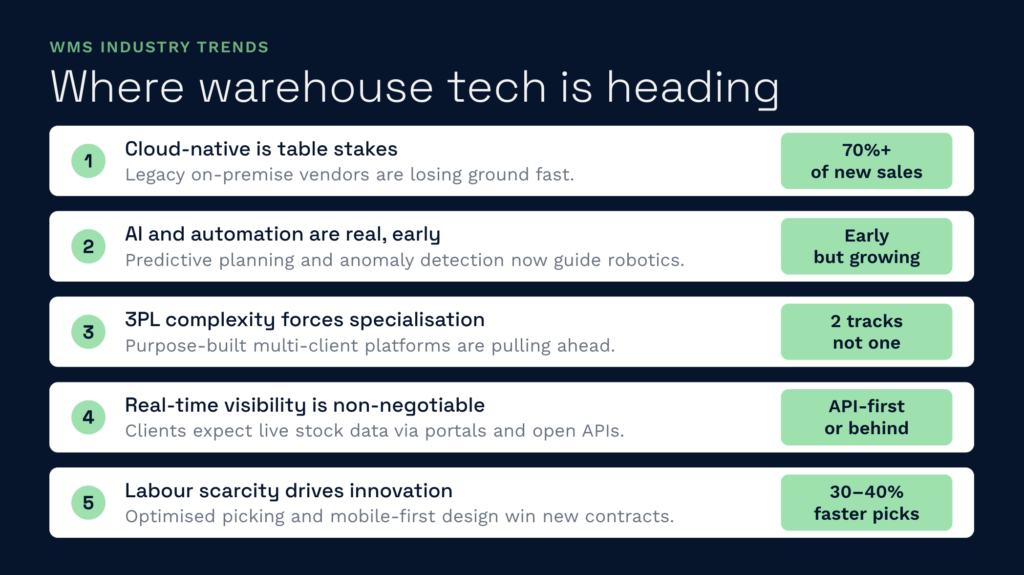
WMS markets are shifting in four directions simultaneously:
Cloud-native is now table stakes
Five years ago, on-premise WMS was still common. Today, 70%+ of new WMS sales are cloud-based. The vendors still holding on to legacy server-based systems are losing market share to cloud-native competitors. If a vendor hasn’t migrated to cloud by 2026, they’re betting on maintenance contracts, not innovation.
AI and automation are early-stage but real
Warehouse automation (goods-to-person systems, autonomous mobile robots, automated sortation lines) is growing, and WMS vendors are adding AI features to orchestrate it: predictive demand, optimised wave planning, and anomaly detection in picking operations. Still early. Not many 3PLs are fully automated yet. But WMS selection should account for your automation roadmap.
3PL complexity is forcing specialisation
Generic WMS platforms are struggling with multi-client operations at scale. Vendors are splitting into two categories: general-purpose systems (good for single-client, can add 3PL features), and purpose-built 3PL platforms (designed from the ground up for multi-client, billing complexity, client segregation). The purpose-built systems are pulling away in the 3PL segment.
Real-time visibility and API-first architecture are becoming non-negotiable
Buyers now expect their clients to see live stock levels, not to email and wait. That requires a white-label portal and an always-on API. Systems that don’t offer these out-of-the-box are at a disadvantage. The winners are building ecosystem plays: native integrations, open APIs, and client visibility as standard.
Labour is driving innovation
With warehouse labour scarce and expensive in the UK, WMS vendors are competing on labour productivity features: optimised picking paths, task-based workflows, mobile-first design, and integration with labour management systems. Pick time per order is now a key metric. The systems that consistently cut picking time by 30–40% are winning new contracts.
Common WMS challenges and how to avoid them
Having looked at the decision framework, here are the pitfalls people actually hit post-implementation:
Data migration chaos
Getting your historical stock data into the new system correctly takes 3–4 times longer than you’ll estimate. Budget 4–6 weeks of full-time effort. If your current system (or spreadsheet) has data quality issues, duplicate SKUs, incomplete location codes, missing cost data, you’ll discover them mid-migration when fixing them becomes urgent and expensive. Do a data audit 3 months before go-live.
Underestimating implementation effort
A vendor will quote 8 weeks, and you’ll plan for go-live in 10. By week 12, you’re still integrating with your ERP and your team is exhausted. Realistic timeline: add 50% to the vendor estimate. If they say 8 weeks, plan for 12.
Poor adoption by warehouse staff
The best WMS in the world fails if your team resists it. The worst causes of resistance: the system is slow (waits for wireless or server), the mobile app crashes mid-pick, or it adds extra steps compared to the old process. Spend 3–4 weeks on training, then be prepared for efficiency dips in week 1–2 of go-live. Give people a month to adjust before you judge the system.
Retrofitting multi-client into a single-client system
If you buy a general-purpose WMS and then realise you need multi-client capability, you’ll be in for a reckoning. The vendor will tell you it can be done but it requires custom development, costs £20,000–£50,000, and the results are never as clean as purpose-built multi-client. Choose the right architecture from the start.
Billing automation that doesn’t match your client contracts
You bill some clients on storage (£/pallet/day), others on activity (£/pick, £/pack, £/despatch), others on retainer. An inflexible billing system will force you to post-process invoices, defeating the point of automation. Make sure the vendor can handle your billing model before you buy. If they can’t, that’s fine — just plan for manual billing adjustments.
Speak to a warehouse expert
If you’re evaluating your options and want to see how a purpose-built WMS works in practice, Clarus is worth a conversation. We work with 3PLs and distributors across the UK to implement warehouse management software that fits the way you operate, not the other way around.
Get in touch with our team to talk through your requirements.