

Third-party logistics providers face a unique operational challenge: managing multiple clients’ inventory, workflows, and billing requirements simultaneously within a single warehouse facility. A standard warehouse management system simply isn’t designed for this complexity. That’s where a WMS for 3PL comes in, a purpose-built solution that handles multi-client operations, client-specific workflows, and activity-based billing all in one platform. This guide explores what 3PL WMS is, how it differs from standard systems, which features matter most, and how to implement one successfully.
What is a 3PL WMS and how does it work?
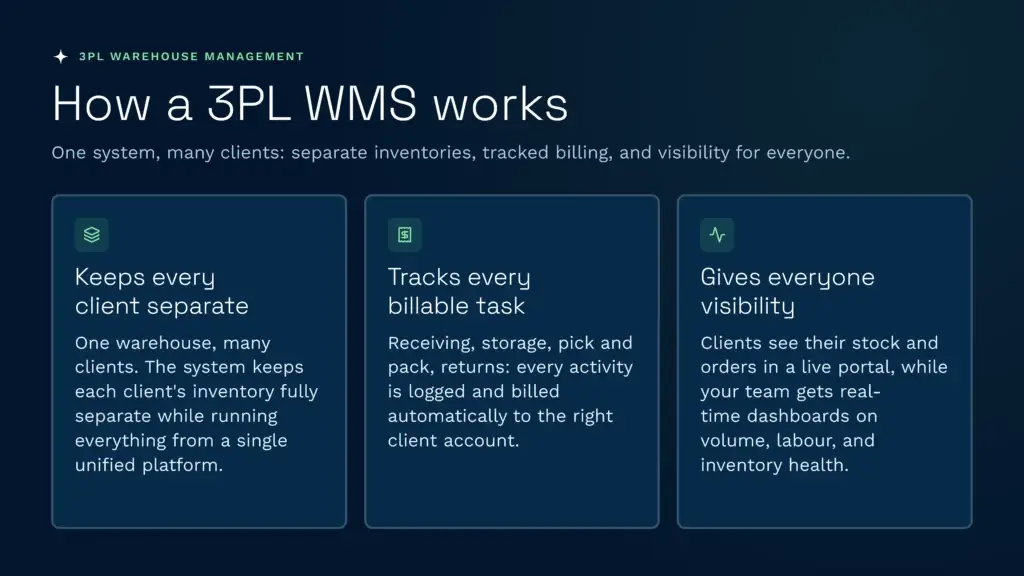
A 3PL warehouse management system is software purpose-built to manage inventory, orders, and operations for multiple clients within the same physical warehouse. Unlike a standard WMS designed for a single company, a 3PL WMS handles the segregation, tracking, and billing requirements of dozens or even hundreds of client accounts simultaneously. It sits at the heart of modern third-party logistics operations, automating everything from receiving and put-away to picking, packing, shipping, and billing across every client account.
The 3PL WMS works by maintaining completely separate inventory records for each client while managing them all within a unified system. When goods arrive at the warehouse, the system captures receiving data and assigns stock to the correct client inventory. As orders are picked and shipped, the system tracks which client each order belongs to and logs every billable activity, receiving fees, storage, pick-and-pack labour, returns processing, against the right account. This automation is critical.
Real-time visibility is at the heart of how a 3PL WMS operates. Every movement, receipt, relocation, pick, pack, updates inventory counts instantly and ties that activity to the correct client. Client-facing portals allow your customers to log in and see exactly where their stock is, what orders are pending, and what they owe. Meanwhile, your operations team gains live dashboards showing order volume, labour productivity, and inventory health across the entire facility. This dual visibility keeps both 3PL providers and their clients informed and aligned.
How does a WMS for 3PL differ from a standard WMS?
The fundamental difference between a 3PL WMS and a standard warehouse management system lies in multi-client architecture and the business logic built around it. A standard WMS assumes one company owns the warehouse and one company’s inventory is being managed. A 3PL WMS assumes multiple companies’ inventory is present simultaneously, each with different products, workflows, service levels, and pricing models, all running in parallel within the same operation.
Standard warehouse systems treat a second client’s inventory as a complication to be worked around through custom development. A 3PL WMS treats it as the core use case. Multi-client segregation isn’t an add-on; it’s foundational. Each client’s inventory is kept completely separate, with client-specific picking rules, storage rules, and cycle count frequencies configurable without touching code. Permissions and roles ensure warehouse staff see only what they need and clients see only their data. Audit trails capture every movement so disputes can be resolved with proof.
Billing and commercial operations are another critical differentiator. A standard WMS tracks what happened in the warehouse but leaves billing to a separate accounting system. A 3PL WMS makes billing part of the core workflow. It logs every activity, receiving, storage day, pick fee, pack fee, returns fee, in real time and automatically ties it to the correct client account. A 3PL WMS supports activity-based billing rules that vary by client, so one customer might pay £1 per unit picked while another pays a flat £2 per order. A standard WMS cannot do this without heavy customisation.
Integration requirements also differ significantly. A 3PL WMS must connect seamlessly to each client’s sales channels, Shopify, WooCommerce, BigCommerce, NetSuite, so orders flow directly in without manual rekeying. It must support EDI for wholesale customers and API-first design so new integrations can be added without disrupting operations. A standard WMS might connect to one company’s e-commerce platform; a 3PL WMS must handle dozens simultaneously. This is why cloud-native, purpose-built 3PL systems are rapidly replacing on-premises solutions. Advanced WMS enhances 3PL value through deep platform integration and operational flexibility.
What features should a 3PL WMS have?
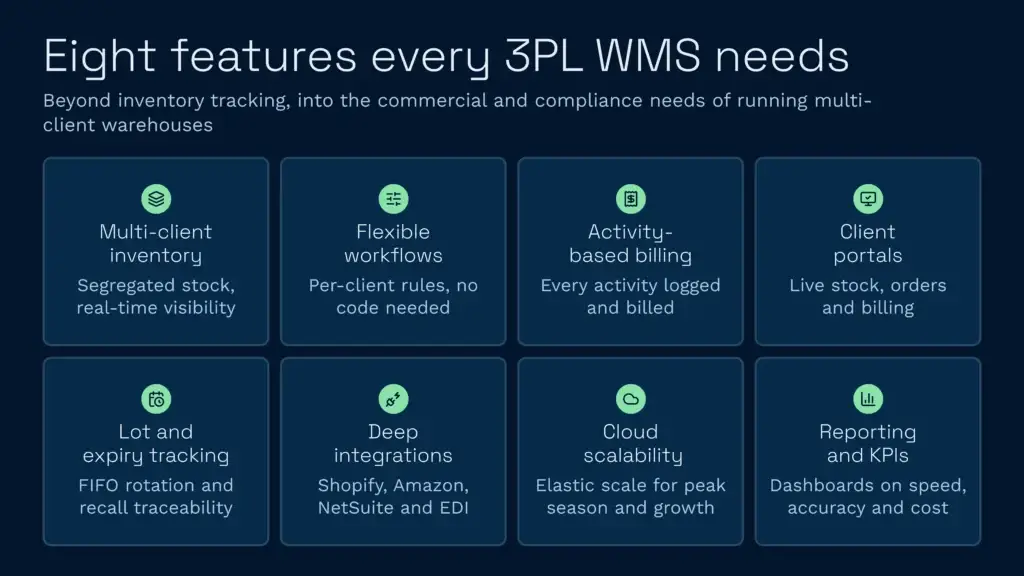
The strongest 3PL warehouse management systems share a set of core features essential for managing multiple clients efficiently and profitably. These features go beyond basic inventory tracking to address the commercial, operational, and compliance needs specific to third-party logistics.
Multi-Client Inventory Management with True Segregation
The system must maintain completely separate inventory records for each client, preventing cross-contamination and ensuring accurate fulfilment. Each client’s SKUs, quantities, storage locations, and movement history must be isolated. Real-time visibility into inventory levels is non-negotiable—the system should instantly reflect every movement so clients always see accurate stock counts. Location-based tracking (bin, rack, aisle) ensures pickers find products quickly and accurately.
Flexible Picking, Packing, and Storage Rules
Different clients have different requirements. One may require FIFO (first-in, first-out) picking; another may allow any bin. One might batch orders by destination; another might require single-order fulfilment. A robust 3PL WMS lets you configure these rules per client without code changes, so each customer gets their exact workflow while you manage everything from one system.
Activity-Based Client Billing
Logging and billing every activity is what turns a warehouse into a profitable operation. Receiving fees (per hour or per pallet), storage fees (per pallet per month or per cubic metre), pick-and-pack fees (per unit or per order), labour time, returns processing, kitting—all must be automatically logged and attributed to the right client. Automated billing reduces administrative overhead and eliminates billing disputes.
Client-Facing Visibility Portals
Clients expect to see their inventory, orders, and shipments in real time. A portal showing stock levels by SKU, pending orders, shipment tracking, and billing summaries keeps clients engaged and reduces support inquiries. Portals also empower clients to manage their own accounts—uploading SKU lists, adjusting inventory, checking reports—freeing your team from repetitive admin.
Lot, Batch, and Expiration Tracking
For pharmaceuticals, food, cosmetics, and other regulated categories, tracking lot numbers and expiration dates is non-negotiable. The system must support FIFO expiry rotation, automatic alerts for approaching expiration, and full traceability for recalls. Regulatory compliance and customer safety depend on this.
Deep E-Commerce and ERP Integrations
Orders must flow directly from your clients’ sales channels into the WMS. Out-of-the-box connectors for Shopify, WooCommerce, BigCommerce, Amazon, eBay, NetSuite, and other major platforms eliminate manual data entry. EDI support for B2B and retail wholesale ensures compliance with customer requirements. API-first architecture means new integrations can be added without system downtime.
Scalability and Cloud Infrastructure
Peak seasons, client growth, and promotional surges create volume spikes. A cloud-native WMS scales elastically—processing more orders, adding warehouses, onboarding new clients, without infrastructure overhaul. You avoid the capital cost and operational complexity of on-premises servers and gain automatic backup, security patching, and system updates included in your subscription.
Advanced Reporting and KPI Tracking
A 3PL WMS should provide detailed dashboards showing order accuracy rates, fulfilment speed, labour productivity, inventory turnover, and cost per unit shipped. Drill-down capability lets you see performance by client, product, shift, or warehouse. These insights drive operational improvements and highlight profitability gaps.
How much does a WMS for 3PL cost?
WMS pricing for 3PL operations varies widely depending on system complexity, deployment model, and provider. Understanding the cost structure helps you budget accurately and avoid surprise fees.
Software Licensing and SaaS Models
Cloud-based SaaS 3PL WMS systems typically charge between £500 and £5,000+ per month depending on features, user count, and transaction volume. Some providers use tiered pricing: a base monthly fee plus per-warehouse add-ons, per-client add-ons, or per-order fees. On-premises licensed software requires higher upfront investment (often £20,000 to £100,000+) plus annual maintenance, server infrastructure, and IT staff.
For most growing 3PLs, cloud SaaS models offer better economics—lower upfront cost, predictable monthly expense, automatic updates, and no IT overhead. Gartner projects that by 2027, over 70% of enterprises will use industry-specific cloud platforms, reflecting this shift.
Implementation and Setup Costs
Implementation can range from £10,000 for a straightforward single-warehouse setup to £50,000+ for complex multi-warehouse operations with heavy custom integration. The timeline typically spans 1–4 months depending on complexity. Costs cover requirements analysis, system configuration, data migration from legacy systems, staff training, and go-live support.
Per-Transaction and Usage Fees
Many providers charge per order, per SKU scanned, or per active user. These fees can add £500–£2,000+ monthly depending on throughput. Understanding your typical daily order volume and SKU count is essential before signing a contract, as a 20% increase in volume could materially increase your costs.
Total Cost of Ownership (TCO) Comparison
A typical mid-sized 3PL (100,000–500,000 orders annually across 5–20 clients) might budget as follows:
- SaaS software license: £2,000–£4,000 per month
- Implementation: £15,000–£30,000 one-time
- Training and support: £1,000–£3,000 annually
- Hardware (scanners, devices): £5,000–£15,000 initial capital
- Integration and custom development: £5,000–£20,000 depending on scope
Total first-year cost: £50,000–£100,000. Year 2 onwards: £30,000–£60,000 annually. This investment typically pays for itself within 12–18 months through labour savings, reduced errors, faster fulfilment, and improved client retention.
How do you implement a WMS for a 3PL operation?
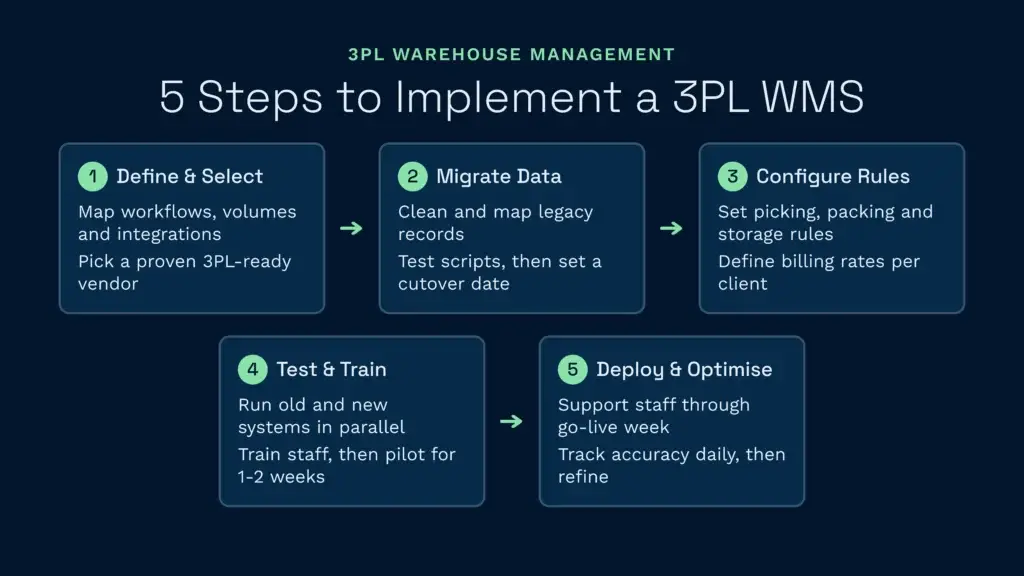
Implementing a new 3PL WMS is a structured project. Following a clear process minimises disruption and ensures successful adoption across your team and clients.
Step 1: Define Requirements and Select a Vendor
Start by documenting your current workflows, pain points, and future growth plans. How many clients do you serve? What order volume and SKU count? Which sales channels do clients use? Do you handle regulated goods, hazardous materials, or temperature-controlled stock? What integrations are non-negotiable? Once you’ve answered these questions, evaluate vendors against your requirements. Look for warehouse management systems from Gartner leaders with strong 3PL-specific features, proven track records in your industry, and solid API documentation.
Step 2: Plan Data Migration and System Configuration
Data migration is the most common 3PL WMS implementation challenge. Inconsistent SKU data, duplicate records, incorrect inventory counts, and mismatched client configurations often surface after go-live. Spend time upfront cleaning your legacy data. Map each field in your old system to the new one. Test migration scripts on a sample of data and validate counts before attempting a full migration. Agree on a cutover date, typically a weekend, when the old system goes offline and the new one takes over.
Step 3: Configure Workflows and Business Rules
Work with your vendor to configure the system to match your operations. Define picking rules (FIFO, LIFO, by zone), packing rules (weight limits, fragility flags), storage rules (hazmat restrictions, temperature zones), and billing rules (what activities are billable, at what rates, for which clients). If clients have unique requirements, configure those too. A system that’s properly tuned to your workflow requires minimal workarounds and earns faster adoption from staff.
Step 4: Test, Train, and Pilot
Before go-live, run parallel testing. Process a subset of your actual orders through both the old and new system simultaneously, comparing results. Train your warehouse team on scanning, picking, packing, and reporting workflows. Set up a 1–2 week pilot with a subset of inventory or clients so your team can gain confidence before full deployment. Document any issues and fix them before rolling out to the entire operation.
Step 5: Deploy and Optimise
Go live on a chosen date. Have a support team on-hand the first few days to troubleshoot issues and coach staff through new processes. Monitor key metrics, picking accuracy, order cycle time, labour hours, daily for the first month. You’ll likely identify tweaks to configurations or workflows. Make these adjustments quickly so staff and clients see continuous improvement. After 30 days, conduct a lessons-learned session and plan for phase 2 enhancements if needed.
The Clarus WMS difference for 3PLs
Many general-purpose warehouse systems claim to support 3PL operations, but few are purpose-built for the complexity and scale of real third-party logistics. We designed Clarus WMS as a 3PL Management System from the ground up, with multi-client operations, activity-based billing, and client-facing portals as core features—not afterthoughts.
What sets Clarus apart is the combination of purpose-built architecture and practical implementation support. Our Warehouse Management Solutions handle complex multi-client scenarios that would require heavy customisation in generic systems. We work alongside you through implementation, configuring workflows to match your operations rather than forcing you to change how you work. And our WMS Integrations connect directly to your clients’ sales channels, Shopify, WooCommerce, BigCommerce, and more, so orders flow in automatically without manual rekeying.
If you’re tired of patching together general-purpose software to fit 3PL needs, or if you’re considering a system upgrade, Clarus is built for warehouses like yours. Learn what a WMS can do for your operation, and explore our Cost of Warehousing UK Guide to understand the financial impact of optimised warehouse operations. Request a demo to see how Clarus can streamline your multi-client workflows and improve your bottom line.