

Choosing the best ERP software is one of the most critical decisions a business can make. Your enterprise resource planning system touches everything: finance, human resources, procurement, inventory, and supply chain. The right solution streamlines operations, cuts costs, and gives you real-time visibility across your entire business. But with dosens of top ERP systems on the market, how do you know which is right for you?
This guide walks you through what ERP software does, the best erp systems available today, and how to choose one that fits your specific needs. We’ll also explore how the best ERP software works with other critical systems, like warehouse management software, to create a truly integrated operation.
What Is ERP Software and Why Does Your Businfess Need It?
ERP stands for Enterprise Resource Planning. It’s software that integrates all your core business processes into one system. Think of it as the nervous system of your organisation. Finance, HR, procurement, manufacturing, order management, and more all connect to the same database, sharing information in real time.
Without ERP, your finance team uses one tool, HR uses another, and operations uses a third. Data sits in different places. Updates don’t sync. Your CEO can’t get an accurate picture of cash flow or inventory without asking multiple departments. Decisions get delayed.
The best ERP software solves this. When an order comes in, the system automatically updates inventory, generates a sales order, schedules production (if needed), reserves stock, and alerts finance to raise an invoice. Everyone sees the same data. There are no spreadsheets floating around with conflicting information.
What Are the Top 10 ERP Systems?
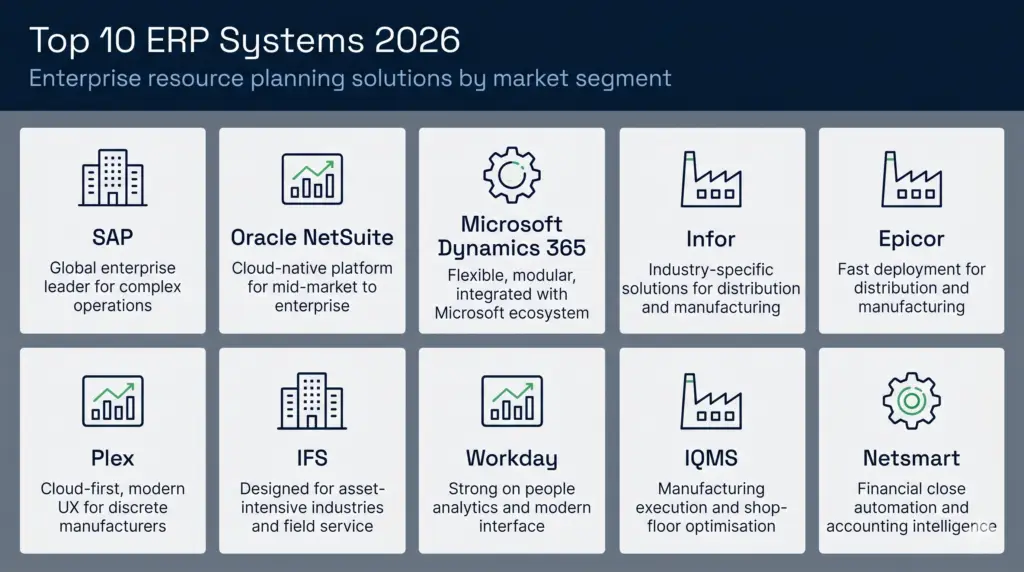
The ERP market is crowded, but a handful of solutions dominate. Here’s what you need to know about the most used ERP software:
- SAP: The global leader. SAP powers huge enterprises with complex operations. It’s powerful, mature, and expensive. Implementation can take 12-24 months.
- Oracle NetSuite: Cloud-native and designed for mid-market to enterprise businesses. Strong for multi-subsidiary operations and e-commerce. Good global presence.
- Microsoft Dynamics 365: Tight integration with Office 365 and Azure. Flexible and modular. Popular in organisations already invested in Microsoft tools.
- Infor: Industry-specific solutions (manufacturing, distribution, healthcare). Good for businesses with specialised needs. Strong on warehouse and supply chain features.
- Epicor: Built for distribution and manufacturing. Smaller than SAP but faster to implement. Growing in mid-market segments.
- Plex: Cloud-first approach aimed at discrete manufacturers. Modern interface, good mobile experience. Newer but gaining traction.
- IQMS (part of Dassault): Focused on manufacturing execution. Less of a full ERP, more specialised for the shop floor.
- Workday: Originally HR-focused, expanding into financials. Strong on people analytics and modern UX.
- IFS: Designed for asset-intensive businesses: utilities, energy, telecoms. Excellent field service and maintenance modules.
- Netsmart/BlackLine: Financial close and accounting automation. Not a full ERP but increasingly used alongside ERP systems.
If you want more detailed comparisons, check out top ERP systems analysis and ERP software comparison resources for independent reviews.
Which ERP System Is the Best?
There’s no single “best” ERP software. It depends on your business size, industry, budget, and growth plans.
For large enterprises: SAP or Oracle lead the pack. They handle complexity, scale to thousands of users, and support complex multi-entity structures. The trade-off is cost and implementation time.
For mid-market: Microsoft Dynamics 365, Infor, or NetSuite often win. They’re more affordable than SAP, faster to deploy, and still powerful enough to handle significant complexity.
For distribution and 3PL: Infor and Epicor are strong choices because they understand the unique needs of warehousing, logistics, and multi-client billing. If you run a 3PL operation, a purpose-built WMS like Clarus often works better alongside a lightweight ERP than trying to run everything through a heavy, finance-focused system.
For manufacturing: SAP, Infor, Plex, and Epicor all have strong manufacturing modules. Plex is newer and has better UX; Epicor is faster to implement.
To compare options head-to-head, the ERP product comparison guide offers detailed feature matrices.
ERP Software vs Warehouse Management Systems: What’s the Difference?
This is crucial and often misunderstood. What is an ERP system and how does it differ from a WMS?
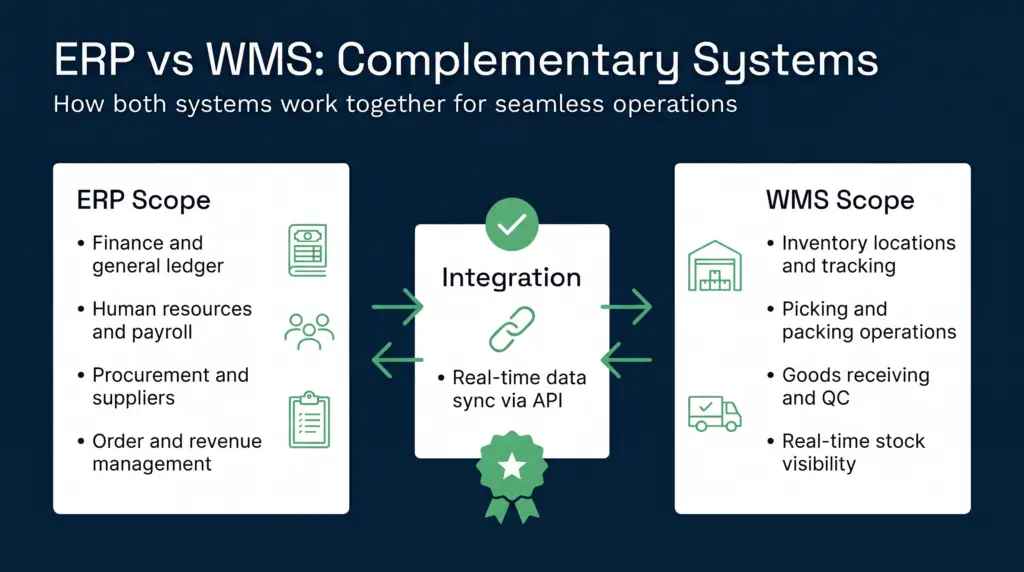
ERP covers the whole business: Finance, HR, procurement, order management, general ledger, accounts payable. It’s a business-wide backbone. It answers “How much profit did we make?” and “Are we meeting payroll obligations?”
WMS is laser-focused on warehouse operations: It tracks inventory locations, picks and packs orders, manages receipts, handles cycle counts, and optimises labour. It answers “Where is this SKU?” and “How do we pick this order most efficiently?”
The two systems speak different languages. ERP thinks in “units sold”. WMS thinks in “pallets received” and “picks completed per hour”. ERP updates inventory every hour or every night in a batch. WMS updates it in real time, unit by unit.
This is why many businesses run both. A warehouse management system like Clarus handles the warehouse floor with precision, speed, and 3PL-specific features like multi-client billing and cross-docking. The ERP handles finance and procurement. They integrate via API so data flows both ways.
How ERP and Warehouse Management Systems Work Together
The integration between ERP and WMS is where the real power emerges. Here’s how it works:
Inbound Receiving
A purchase order is created in your ERP. It flows to the WMS, which prepares the receiving dock, assigns locations, and verifies goods on arrival. Once confirmed, the WMS updates the ERP with the accurate receipt, triggering a goods receipt note and an accounting entry.
Inventory Visibility
The WMS holds the truth about what’s actually in the warehouse. ERP relies on it. When a customer orders, the ERP knows the item is in stock because the WMS confirmed it’s there, in a specific location, and available for picking.
Order Fulfilment
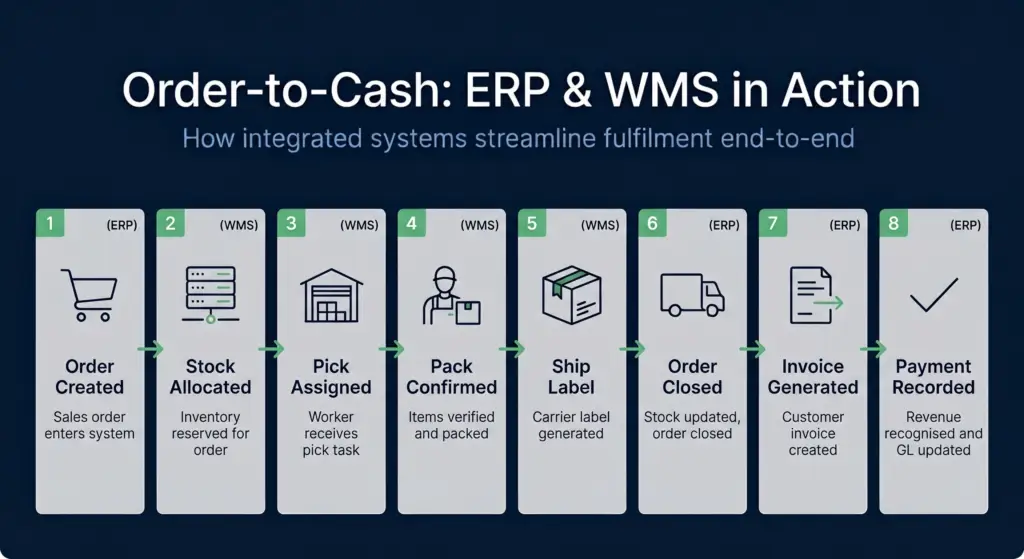
A sales order enters the ERP. It’s sent to the WMS, which allocates stock, picks the order, packs it, and generates a label. Once shipped, the WMS tells the ERP, which closes the order, triggers invoicing, and records the revenue.
3PL Billing
For logistics operators, WMS and TMS integration is essential. The WMS tracks labour, storage, and moves by client. It generates billable events (receipts, picks, lines picked, weight handled). The ERP pulls this data and generates invoices for each client. Without a WMS designed for multi-tenancy, manual reconciliation is a nightmare.
Clarus WMS is built for this. It automatically tracks billable activity, generates ready-to-use billing feeds, and integrates cleanly with finance systems. It saves 3PLs dosens of hours per month on billing reconciliation.
Cycle Counting and Reconciliation
The WMS guides cycle counts, records results, and flags discrepancies. The ERP adjusts the GL based on variance counts. This keeps financial records accurate without a full physical inventory shutdown.
Key Features to Look for in the Best ERP Software
Not all ERP solutions are built the same. When evaluating options, prioritise these features:
- Real-time data: Batch processing is slow. Look for systems that update instantly across all modules.
- API-first architecture: You’ll integrate with a warehouse system, e-commerce platform, payment processor, and more. Open APIs matter.
- Mobile-friendly: Finance teams are often mobile now. Approvals, expense entry, and dashboards should work on any device.
- Industry-specific templates: Generic ERP slows you down. Look for pre-built configurations for your industry.
- Scalability: Can it grow with you? If you expand to a second warehouse or acquire another business, does the system handle it?
- Reporting and analytics: You need dashboards, not just transaction lists. Look for visual reporting, forecasting, and drill-down analysis.
- Support and implementation: The software is only half the battle. Good implementation partners and responsive support matter enormously.
- Cost structure: Is it per-user, per-module, or per-transaction? Understand the total cost of ownership over five years, not just the license fee.
For a detailed ERP system examples analysis with real-world use cases, see that resource.
Secondary Keywords and the Bigger Picture: Best ERP Systems and Top ERP Systems
When businesses search for the best ERP systems, best ERP system, and top erp systems, they’re usually at different stages of the buying journey.
If you’re early in evaluation, you’re researching what features matter and what the market looks like. That’s this article.
If you’re further along, you’re comparing specific vendors, running demos, and checking references. At that point, look for customer testimonials, ROI case studies, and industry analyst reports.
One common insight across all evaluations: ERP alone isn’t enough for warehouse-heavy businesses. If you run a 3PL, manage multiple warehouses, or handle complex order fulfilment, you’ll benefit from a dedicated system. The best ERP software integrates tightly with specialised tools like best warehouse management system solutions. Think of them as partners, not competitors.
The other piece many businesses overlook is cost. Beyond licence fees, consider cost of warehousing and operational efficiency. A WMS that cuts warehouse order picking time by 20% often pays for itself in six months through labour savings.
Speak to a warehouse expert
If you’re evaluating your options and want to see how a purpose-built WMS works in practice, Clarus is worth a conversation. We work with 3PLs and distributors across the UK to implement warehouse management software that fits the way you operate — not the other way around.
Get in touch with our team to talk through your requirements.
{“@context”: “https://schema.org”, “@type”: “FAQPage”, “mainEntity”: [{“@type”: “Question”, “name”: “What Is ERP Software and Why Does Your Businfess Need It?”, “acceptedAnswer”: {“@type”: “Answer”, “text”: “ERP stands for Enterprise Resource Planning. It’s software that integrates all your core business processes into one system. Think of it as the nervous system of your organisation. Finance, HR, procurement, manufacturing, order management, and more all connect to the same database, sharing information in real time.”}}, {“@type”: “Question”, “name”: “What Are the Top 10 ERP Systems?”, “acceptedAnswer”: {“@type”: “Answer”, “text”: “The ERP market is crowded, but a handful of solutions dominate. Here’s what you need to know about the most used ERP software:”}}, {“@type”: “Question”, “name”: “Which ERP System Is the Best?”, “acceptedAnswer”: {“@type”: “Answer”, “text”: “There’s no single “best” ERP software. It depends on your business size, industry, budget, and growth plans.”}}, {“@type”: “Question”, “name”: “ERP Software vs Warehouse Management Systems: What’s the Difference?”, “acceptedAnswer”: {“@type”: “Answer”, “text”: “This is crucial and often misunderstood. What is an ERP system and how does it differ from a WMS?”}}]}