

Wholesale distributors operate under pressure that generic warehouse management software simply isn’t designed to handle. You’re managing thousands of SKUs across multiple locations, serving hundreds of customers with different pricing tiers, handling EDI orders from retail partners who expect perfection, and fighting margin compression at every turn. The wrong WMS, or worse, no WMS, turns all of that complexity into manual labour, spreadsheet sprawl, and costly errors.
A purpose-built lagerstyringssystem for wholesale handles the operational realities your business faces every day. This guide walks through what makes a WMS genuinely suited to wholesale distribution, shows you the requirements checklist that matters, and explains how to evaluate your options.
What Makes a WMS Right for Wholesale Distribution
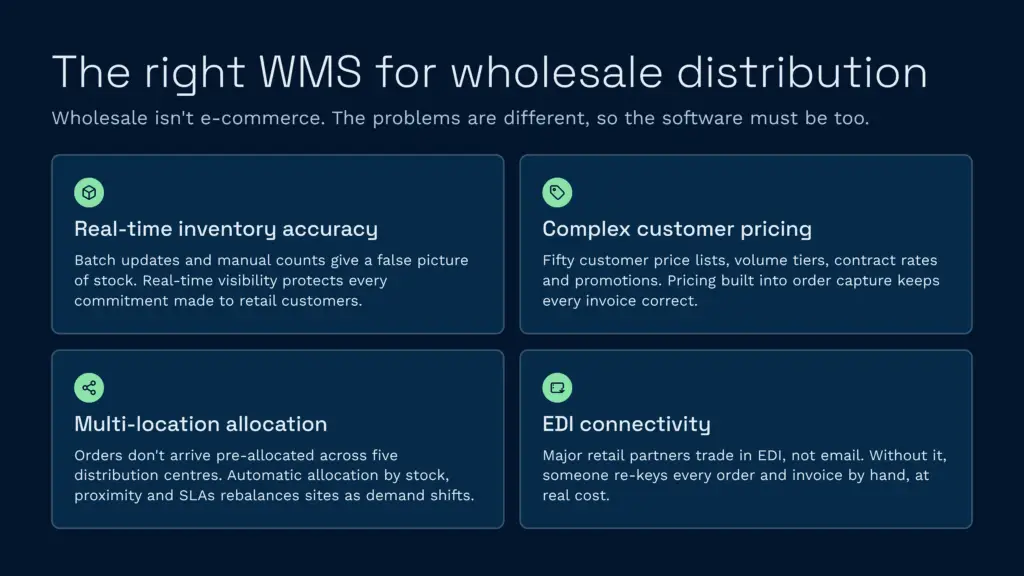
Wholesale distribution is fundamentally different from e-commerce or single-customer 3PL operations. The problems you solve aren’t the same, so the software that solves them shouldn’t be, either.
In wholesale, inventory accuracy is a business requirement, not a nice-to-have. Your retail customers don’t tolerate stockouts, and your ability to commit inventory in real time directly determines whether you win or lose the order. A WMS that updates inventory twice a day, or worse, depends on manual counts, creates a false sense of what you actually have. The result is either overpromising and frustration, or underpromising and leaving margin on the table.
The second reality is pricing complexity. You might manage fifty different customer-specific price lists. One customer gets tiered volume discounts; another pays a contract rate that’s flat; a third has promotional pricing that expires on a date they negotiate annually. A generic order management system treats pricing as an afterthought, the WMS doesn’t see it. A purpose-built wholesale WMS embeds customer pricing logic directly into order capture, so you never risk invoicing at the wrong rate.
Third, multi-location coordination creates coordination problems. When you operate five distribution centres, a customer order doesn’t arrive already allocated to one location. A good wholesale WMS allocates automatically based on inventory levels, proximity to the customer, and SLAs, and rebalances stock between sites based on demand patterns. Manual allocation is slower and creates invisible inefficiency.
Finally, EDI — Electronic Data Interchange, isn’t optional. Retail partners like Tesco, Sainsbury’s, Costco and B&Q don’t place orders by email. They send purchase orders (850s), expect advance ship notices (856s), and process invoices (810s) in standardised EDI format. A WMS without EDI connectivity means someone on your team is manually re-keying orders from your EDI mailbox into the system. That’s a dead cost and a source of error.
Key Requirements for Wholesale WMS Selection
Before you evaluate specific products, build a requirements checklist. These are the capabilities that separate purpose-built wholesale systems from generic or legacy alternatives.
Real-Time Inventory Visibility Across Locations
Every location, every DC, satellite warehouse, or consolidation centre, must update inventory in real time as stock moves. Not at shift end. Not daily. In real time. If a picker takes ten units off the shelf, the system must show ten units less immediately, so when your sales team checks available stock, they see accurate data. Inaccurate inventory breeds two problems: overselling (leading to backorders and customer complaints) and hoarding (leading to excess stock and carrying costs).
Look for systems that update stock on scan, not batch. Every strekkode scanned, at receipt, putaway, pick, pack, or return, should move inventory instantly.
Multi-Warehouse Order Allocation
When an order lands, the system should automatically allocate stock from the best location. “Best” means closest to the customer, most available, or meeting the customer’s service level. If you’re running five DCs, manual allocation adds days to order processing and creates shipping inefficiency. A good WMS allocates in seconds based on rules you define.
B2B Customer Self-Service Portals
Your retail customers, Tesco, Co-op, independent grocers, need a portal to see their stock levels, order status, shipment tracking, and invoice history without calling your team. A portal reduces your workload and improves their experience. Look for white-labelable portals so your branding is front and centre.
EDI and Trade Customer Support
The WMS must ingest EDI 850 purchase orders, map them to your internal order format, and process them through picking and packing without manual intervention. It should also generate 856 advance ship notices and 810 invoices automatically. If EDI is being manually converted somewhere in the pipeline, you’re missing the entire point of automation.
ERP and Accounting System Integration
Your WMS needs to talk to your accounting software, whether that’s Sage 200, Microsoft Dynamics, or QuickBooks. Data should flow bidirectionally: sales orders from the ERP trigger picking in the WMS; shipments confirm back to the ERP to generate invoices automatically. If you’re re-entering data between systems, you’re creating reconciliation hell.
Flexible Pricing Rules and Customer-Specific Logic
Your WMS should enforce customer-specific plukking, packing, and pricing rules. One customer wants their orders sorted by store number; another wants a specific label format; a third gets a 15% rebate on units over 100 per SKU. The system should apply these rules automatically during order processing, not as a spreadsheet you maintain separately.
Lot, Serial, and Expiry Tracking
If you distribute food, pharmaceuticals, or any product with expiry dates or lot control requirements, your WMS must support FIFO (First In, First Out) or FEFO (First Expire, First Out) rotation. It should block picks that would ship expired stock and flag short-dated inventory for promotions or returns.
Automated Replenishment and Reorder Logic
Your WMS should monitor stock levels and suggest, or automatically trigger, replenishment orders to your supplier when inventory falls below reorder points. For multi-location operations, it should also recommend transfers between sites to balance stock and minimise slow-moving inventory.
How a Purpose-Built WMS Maps to Wholesale Challenges
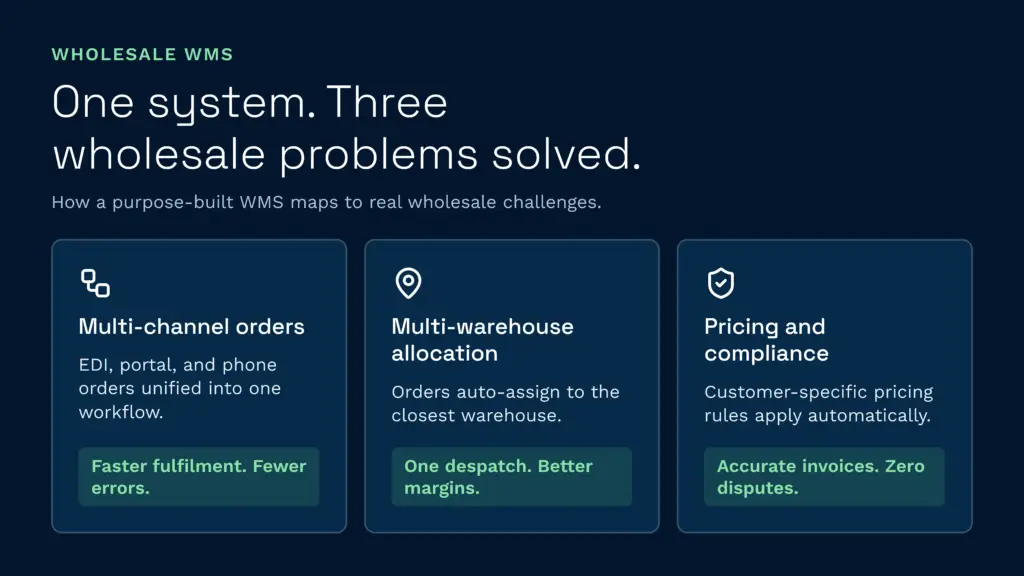
Let’s walk through three real wholesale scenarios and see how the right WMS solves the problem.
Scenario 1: Multi-Channel Order Processing at Scale
You receive orders from three channels: EDI from major retail partners, web orders from your B2B portal, and phone orders from your sales team. Without a WMS, all three are handled differently, EDI orders go to a batch process, portal orders land in an email inbox, phone orders are written down on paper. Errors pile up, fulfilment is slow, and reconciliation is a nightmare.
A wholesale WMS consolidates all three channels into one order intake. EDI orders parse automatically. Portal orders create picking tasks instantly. Phone orders are entered once and routed the same way. Picking, packing, and despatch use the same workflow. Your fulfilment time drops, errors fall, and labour productivity climbs because everyone’s working the same process.
Scenario 2: Multi-Warehouse Inventory Allocation
You operate three distribution centres, North, Midlands, and South. A customer in Manchester places an order for 500 units of Product X. Without a WMS, your team checks inventory manually (or runs a report from the ERP), picks a location based on a guess, and ships from there. The North DC has 200 units and ships what they can; the Midlands has to scramble to cover the rest. Shipping splits, inefficiency, and margin slippage.
A WMS allocates instantly: it sees the North DC is closest to Manchester, has 500 units available, and assigns the whole order there. Picking starts immediately from one location. Shipping is consolidated into one despatch, one freight cost, one tracking number. The customer gets better service; your margin improves.
Scenario 3: Pricing Compliance and Customer-Specific Rules
You have three large customers with different agreements: Customer A gets 15% off all orders over £10,000; Customer B pays a tiered price based on annual volume (higher volume = lower price); Customer C has a fixed contract rate that changes quarterly. An invoice errors to the wrong price, even once, and you’re in a dispute. Manual pricing spreadsheets create delays and inconsistency.
A purpose-built WMS embeds these rules directly. When an order is placed, the system applies the correct price automatically based on customer, order value, and contract terms. Invoices are generated automatically, eliminating manual pricing decisions and disputes. Reporting shows actual vs. contract revenue, so you catch compliance issues before invoices go out.
ERP and Accounting Integration: Sage, Microsoft Dynamics and Beyond
Your WMS can’t work in isolation. It needs to integrate tightly with your ERP and accounting system so that orders, inventory, and financials stay in sync.
Sage 200. Sage is deeply embedded in UK and Irish wholesale distribution. A good WMS should integrate with Sage’s inventory and order modules so that sales orders from Sage create picking tasks in the WMS, and shipments feed back to Sage to auto-generate invoices. The integration should be bidirectional and real-time, not batch processing overnight.
Microsoft Dynamics 365. Dynamics is the standard for mid-market and enterprise distributors. Look for a WMS with native Dynamics integration (via API or pre-built connectors) so that the two systems act as one. You don’t want to maintain dual data entry or reconcile between systems daily.
QuickBooks and other accounting systems. If you’re using QuickBooks, your WMS should push completed orders and shipments to QuickBooks so invoices generate without manual intervention. The integration should include cost of goods sold (COGS) posting so your P&L is accurate.
The integration shouldn’t require custom coding. If your software vendor tells you “we’ll build you a custom integration,” that means ongoing support costs and fragility when your ERP updates. Look for out-of-the-box integrations using APIs or pre-built connectors.
EDI, Trade Customers, and Retail Compliance
If you sell to retail chains, supermarkets, or trade distributors, EDI is non-negotiable. These customers demand standardised data exchange. A WMS without EDI isn’t fit for purpose in wholesale.
What EDI Means for Your WMS
EDI orders arrive in your system as structured data, a purchase order (850) listing exactly what the customer wants, quantities, delivery dates, and special instructions. Your WMS should parse this automatically, validate it against your inventory and customer rules, and create picking tasks without human intervention.
As you fulfil the order, the WMS generates an advance ship notice (856), a message telling the customer exactly what you’re sending, which truck it’s on, and when it will arrive. When you invoice, the WMS generates an 810 invoice with complete line-item details, matching what you actually sent and what the customer expected.
If any of this requires manual intervention, someone hand-keying EDI data into the system, or generating an email instead of a formal 856, you’re not really using EDI. You’re just using it as a delivery mechanism for information you’re re-entering manually.
Retail Partner Compliance Requirements
Major retail partners (Tesco, Sainsbury’s, B&Q, Costco) have compliance standards: deadlines for order acknowledgment, accuracy requirements for shipments, label formats, packaging specifications, and invoice matching rules. Your WMS should enforce these automatically. If a shipment doesn’t meet the customer’s specification, the system should flag it before it leaves the dock.
Look for WMS solutions that include pre-built templates for your major customers, so compliance is embedded from day one, not added as a workaround later.
Real-Time Inventory Visibility and Stock Availability
The moment a pallet arrives at your dock, is it reflected in your system? Or does it sit in your “receiving” queue until someone enters it into the system the next day?
Real-time inventory updates are the difference between a responsive operation and a reactive one. When your sales team checks available stock, they should see the absolute truth. When a customer calls asking if you have 500 units in stock, your team should know instantly, not spend an hour researching.
This requires a few things: strekkodeskanning at every step (receipt, putaway, pick, pack, return), integration between your WMS and point-of-sale or order-management system so sales can query live inventory, and, critically, no batch processing. Every scan should update inventory in real time.
Clarus WMS handles this through a task-based architecture where every action, receipt, putaway, pick, pack, is tracked in real time. Inventory is updated on scan, not at shift end. Clients can see live stock levels through their portal without calling your team. Interspan, a UK distribution company, cut their reporting time by 90% after switching to a real-time WMS, because stock data was accurate the moment they needed it.
Replenishment and Reorder Logic
Managing stock levels across multiple locations and hundreds of SKUs requires intelligent replenishment logic. If you’re doing this manually, checking spreadsheets, emailing reorder suggestions to your procurement team, you’re burning labour and missing opportunities.
A good WMS monitors inventory levels continuously and suggests (or automatically triggers) replenishment when stock falls below configurable reorder points. For multi-location operations, it should also recommend inter-DC transfers when one location is overstocked and another is approaching a stockout. Some systems can even integrate with supplier APIs to place orders automatically when thresholds are hit.
The benefit is clear: less slow-moving inventory, fewer stockouts, and lower labour for procurement. Your holding costs fall, and your fill rate climbs.
Client and Customer-Specific Picking, Packing, and Pricing Rules
In wholesale, one size doesn’t fit all. Your major customers have specific requirements: one wants products sorted by store number before they leave your facility; another requires a specific label format; a third pays a higher price for expedited processing. A WMS without this flexibility forces you to handle exceptions manually.
A purpose-built wholesale WMS lets you define these rules once, per customer, per product, per order type, and applies them automatically during order processing. Packing slips are generated in the customer’s preferred format. Prices are applied according to the customer’s agreement. Picking tasks are sequenced to match the customer’s preference. No exceptions, no manual overrides, no room for error.
This level of flexibility also prevents costly disputes. If an invoice is wrong, it’s because the system applied the wrong rule, which means the rule is fixable and won’t happen again. You’re not dealing with manual errors that are hard to trace and even harder to prevent.
Wholesale WMS Pricing: What to Expect
WMS pricing varies widely depending on deployment model, features, and implementation scope. Here’s what you should expect:
Cloud SaaS (Monthly Recurring)
Cloud-based WMS solutions for wholesale typically cost between £1,000 and £5,000 per month, depending on the number of users, locations, and transaction volume. This model includes hosting, updates, and support. There’s no capital expense, and you can scale up or down as your business changes.
Clarus WMS Pricing starts from £1,000 per month on a monthly rolling contract with no long-term lock-in. All updates and support are included.
On-Premise and Enterprise Licences
Traditional enterprise WMS solutions (Manhattan Associates, Blue Yonder, SAP) operate on a different model: large upfront licensing fees (often £50,000+), implementation costs (£100,000 to £500,000+), and annual maintenance. These systems are designed for operations with 50+ warehouse users and complex, mission-critical requirements. They’re not agile and are expensive to modify.
Hidden Costs to Watch
When comparing WMS solutions, watch for hidden costs:
- Gjennomføring: Some vendors quote a low monthly fee but charge heavily for setup, data migration, and go-live support. Ask for a total cost of ownership over three years, not just the monthly fee.
- Per-transaction pricing: Some EDI or integration platforms charge per transaction. If you’re processing 10,000 EDI orders per month, those costs add up quickly.
- User licensing: Some systems charge per user. If you have 30 warehouse staff, 10 office staff, and they all need access, that’s a significant ongoing cost.
- Storage and bandwidth: Cloud systems sometimes charge for storage volume or API calls. Check the contract carefully.
- Support tiers: 24/7 support, phone access, and dedicated support teams cost more. For a mission-critical operation, it’s money well spent; for smaller operations, standard support may be sufficient.
A good wholesale WMS should be transparent about all costs upfront. Look for vendors who offer a clear per-user or per-location model with no surprise fees.
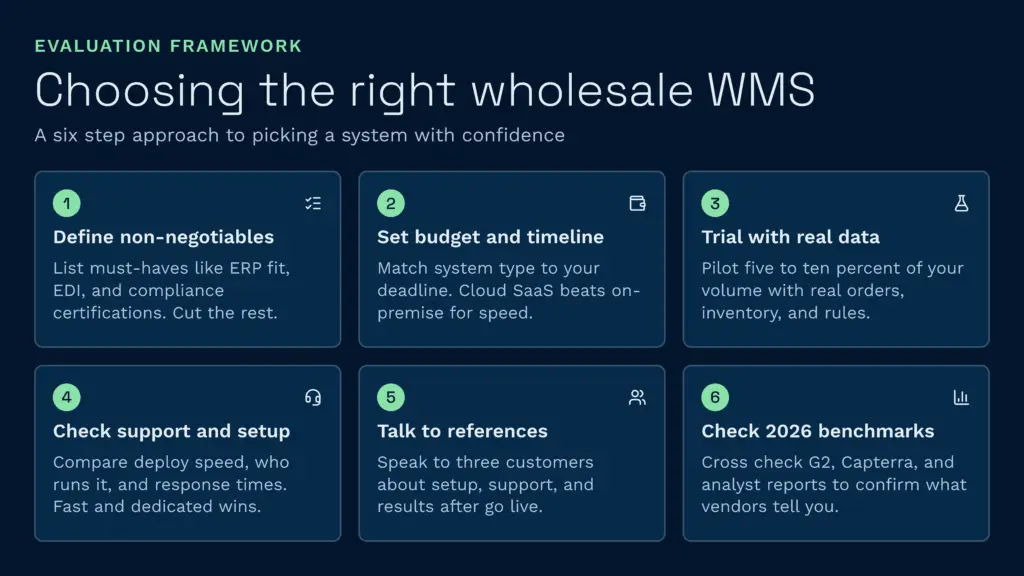
How to Choose the Right Wholesale WMS
Evaluating WMS options is complex. Here’s a structured approach to make a sound decision.
Step 1: Define Your Non-Negotiables
Start with what you must have. Does your operation require:
- Multi-warehouse order allocation?
- EDI order processing?
- Customer self-service portal?
- Integration with your specific ERP (Sage 200, Dynamics, etc.)?
- Real-time inventory visibility?
- Specific compliance certifications (ISO 27001, Cyber Essentials, etc.)?
List the features that are table-stakes for your operation. Any system that doesn’t have them should be eliminated immediately.
Step 2: Assess Your Budget and Timeline
How much can you afford, and how quickly do you need to go live? If you need to launch in four months, a cloud SaaS system is faster than a six-month on-premise implementation. If you have limited budget, look for systems with lower setup costs and transparent monthly fees.
Step 3: Trial with Real Data
Never buy a WMS based on a demo alone. Ask vendors for a trial using your actual orders, inventory data, and customer rules. Run a pilot with 5–10% of your volume and measure the results: how long does it take to process an order? Can it handle your EDI format? Does it integrate cleanly with your ERP?
Step 4: Check Support and Implementation
The WMS is only as good as your implementation. Ask:
- How quickly can they deploy? (Fast cloud systems may go live in 4–8 weeks; enterprise systems take 6 months or longer.)
- Who manages the implementation? (Vendor staff or a partner? Vendor staff is usually faster and better.)
- What’s included in support? (Sub-2-minute response time is better than 4-hour response time.)
- Is there a dedicated implementation team, or are you assigned a shared resource?
Step 5: Talk to References
Ask the vendor for references in your industry. Talk to at least three existing customers. Ask them:
- How long was the implementation, and did it stay on time and budget?
- What’s support like after go-live?
- How easy is it to make changes to rules or workflows?
- What problems did you encounter, and how did the vendor handle them?
- Would you buy it again, knowing what you know now?
If the vendor is evasive about references, or references seem generic and scripted, move on.
Step 6: Look at Den beste programvaren for lagerstyringssystemer i 2026 Benchmarks
Compare systems side-by-side. Look at G2, Capterra, and industry analyst reports for verified customer reviews and comparative rankings. Use these to validate what vendors are telling you and to spot patterns in customer feedback.
Speak to a Warehouse Expert
If you’re evaluating your options and want to see how a purpose-built WMS works in practice, Clarus is worth a conversation. We work with wholesale distributors and 3PLs across the UK to implement warehouse management software that fits the way you operate, not the other way around.
Ta kontakt med teamet vårt å snakke gjennom dine krav.