

If you run a third-party logistics operation, your warehouse management system (WMS) isn’t just software, it’s the backbone of how you service clients, track inventory, and invoice for every billable moment. Yet most WMS platforms were built for single-client warehouses. They treat multi-client complexity as an afterthought, stitching together workarounds that leak revenue, confuse clients, and burn your team’s time.
The best WMS for 3PLs is purpose-built from the ground up to isolate stock by client, automate billing capture, and let clients see their own inventory in real time. This guide explores what separates a true 3PL WMS from generic alternatives, walks you through must-have features, and shows you how to shortlist vendors that actually fit how you operate.
What Is a 3PL WMS and How Does It Differ from Standard Warehouse Management?
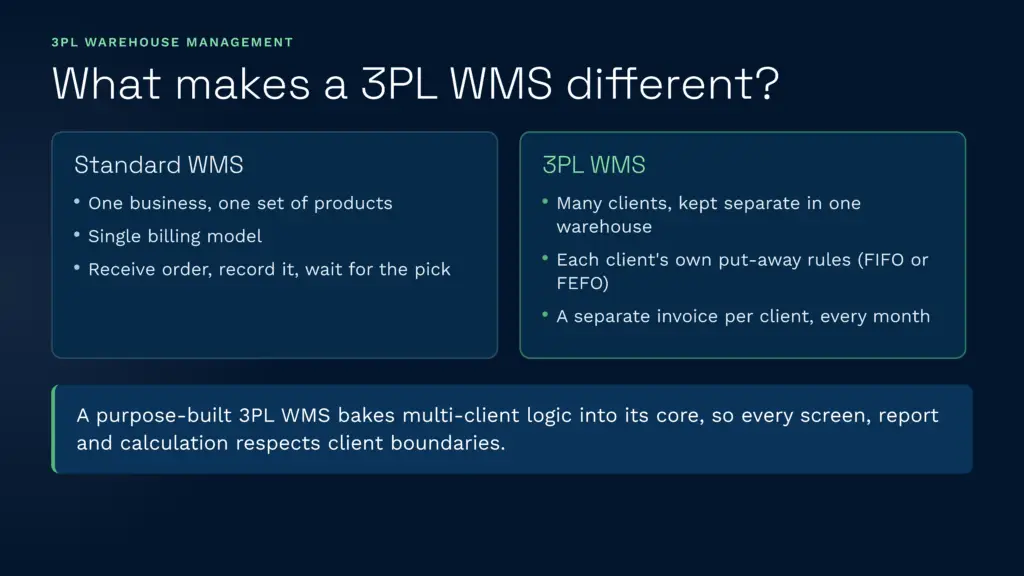
A standard WMS tracks inventory for a single business, one organisation, one set of products, one billing model. A 3PL WMS does something fundamentally different: it manages inventory, workflows, and Abrechnung for multiple independent clients within a single warehouse, without their data overlapping.
Think of the operational differences. In a single-client warehouse, the WMS receives a purchase order for 100 units, records them, and waits for a pick instruction. In a 3PL warehouse, the WMS receives inbound shipments from five different clients simultaneously, segregates them by client ID, applies each client’s own put-away rules (some want FIFO, others FEFO), routes picks through their inventory in the right order, and at month-end generates a separate invoice for each one, capturing storage fees, picking charges, handling costs, and value-added services.
A generic WMS retrofitted for multi-tenancy ends up with clients looking identical inside the system. You manually override workflows, track billing in spreadsheets, and spend hours reconciling invoices because the system didn’t capture a crucial billable event. A purpose-built 3PL WMS bakes multi-client logic into its core architecture: every screen, report, and calculation respects client boundaries.
Must-Have Features for 3PL WMS Software
Not every WMS is fit for 3PL work. Here are the non-negotiables:
Multi-Client Stock Segregation and Inventory Isolation
The first rule of 3PL warehousing is that your clients’ inventory must never mix. The WMS must maintain complete data isolation, Client A’s SKUs don’t appear in Client B’s reports, their stock movements don’t cross paths, and if Client B’s warehouse order goes missing, it doesn’t compromise Client A’s traceability.
Look for systems that treat multi-tenancy as architectural, not a feature added later. Clarus WMS, for example, segregates each client’s entire dataset, stock ledgers, transaction history, Berichterstattung, und Abrechnung, within a single unified environment, so your team sees all clients from one screen but each client’s data sits completely separate.
Automated 3PL Billing Engine
Manual billing is where 3PLs lose the most money. A warehouse manager might forget to record a pallet stored last week, a pick not flagged in the system, or a rush fee negotiated verbally. By month-end, you’re chasing paper records and your client is disputing the invoice.
A capable 3PL WMS captures every billable event in real time: inbound receiving, storage duration (per pallet, cubic metre, or SKU), outbound picks (by order or line), packing, labelling, kitting, and returns. Each client has its own rate card, storage at £5/pallet/week for Client A, £6/pallet/week for Client B, with automated markups for rush handling or temperature-controlled zones. The system generates a complete audit trail so disputes are settled with facts, not guesses.
Lagerraum in der St. John’s Hall, a UK 3PL, cut their invoicing time from four hours to twenty minutes after switching to automated billing. The two-person reconciliation team was freed up entirely.
Client Self-Service Portal
Your clients want visibility without ringing you. A client portal lets them log in, see their current stock levels, track active orders, download past Rechnungen, and raise queries without your team fielding phone calls.
The portal should be white-labelable, your branding, not the WMS vendor’s. Clients see their data only, in real time, with reporting they can customise. This transforms the client relationship: instead of chasing your team for information, they help themselves and you focus on operations.
Configurable Workflows and Picking Logic
Every 3PL client has slightly different needs. One wants wave picking; another wants individual picks. One uses FIFO Drehung, eine weitere FEFO for food products. A rigid WMS forces all clients into one template. A flexible 3PL WMS lets you configure workflows per client, different receiving rules, different pick batching, different quality gates.
Real picking efficiency depends on this flexibility. Smart Wave Picking algorithms can batch orders and optimise walking paths, reducing travel time by up to 50%, but only if the system can be tuned to each client’s SKU layout and order patterns.
Carrier and eCommerce Integrations
Your clients’ orders come from everywhere: their own websites, marketplaces like Amazon, EDI feeds, or API calls. The WMS must speak their language. A robust 3PL WMS integrates with 70+ shipping carriers (DHL, UPS, FedEx, Königliche Post, DPD, Evri, TNT) so you can offer competitive shipping rates. It also plugs into ecommerce platforms—Shopify, WooCommerce, eBay, Etsy, Amazon, so orders sync automatically and your team isn’t re-entering data.
This is where a tms chain integration also matters. If your clients use a Transport Management System to plan deliveries, the WMS should feed it real-time order and shipment status, eliminating double-entry and sync delays.
Scan Verification and Accuracy Control
Pick errors compound. A wrong item shipped to one client doesn’t just cost a return, it erodes trust. A real-time WMS enforces scan verification: the picker scans the SKU barcode, it must match the order line, and if it doesn’t the system halts the pack until corrected. This targets 99.9% pick accuracy, compared to 97–98% for manual pick lists.
Cloud WMS vs On-Premise for 3PLs: The Real Trade-Offs
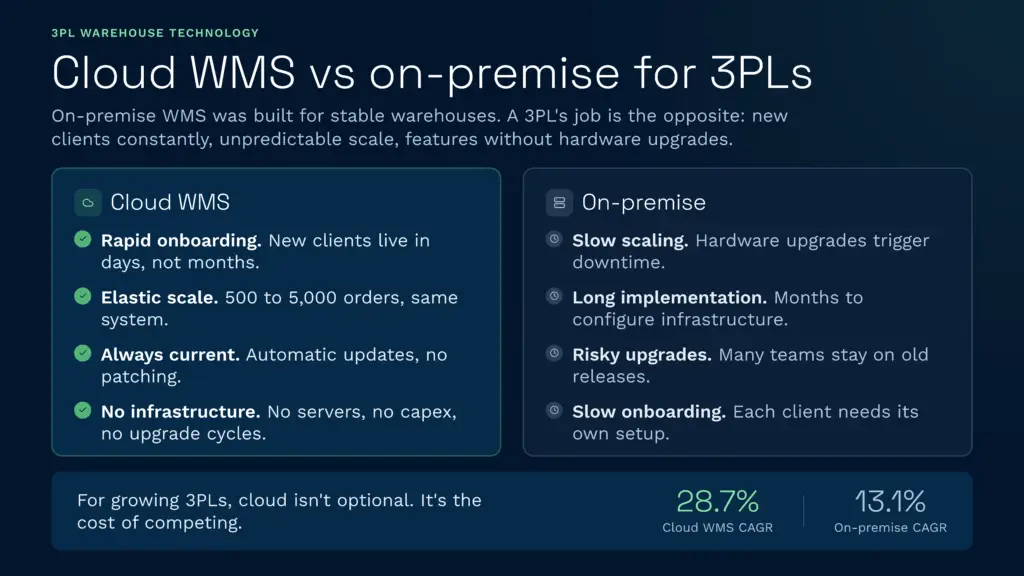
On-premise WMS was built for stability in stable warehouses. A 3PL’s job is the opposite: you’re onboarding new clients constantly, scaling volume unpredictably, and needing to add features without hardware upgrades.
Cloud WMS advantages for 3PLs:
- Rapid client onboarding: Configure a new client’s account, import their SKU data, and begin receiving inventory in days, not weeks or months. On-premise systems require configuration, hardware allocation, and often a lengthy implementation kickoff.
- Elastic scalability: A warehouse handling 500 orders daily can scale to 5,000 orders using the same cloud system with the same performance, because the infrastructure grows with you automatically.
- Always-current software: Cloud WMS releases updates automatically. You never manage versions, patches, or compatibility headaches. You always have the latest features.
- No infrastructure burden: No servers to maintain, no upgrade cycles, no capital expenditure on hardware.
- Sub-2-minute support response: Most cloud WMS vendors (including Clarus) prioritise uptime because downtime directly hits their reputation. On-premise WMS? You’re managing that risk yourself.
On-premise WMS trade-offs:
- Scaling requires hardware upgrades and capacity planning, often triggering downtime during expansion.
- Implementation takes months because systems engineers must configure your physical infrastructure.
- Version upgrades are complex and risky; many organisations stay on old releases to avoid disruption.
- Client onboarding is slow because each new tenant often requires its own data space or configuration set.
For growing 3PLs, cloud is not optional, it’s the cost of competing. Cloud-based WMS is expected to grow at 28.7% compound annual growth rate, compared to only 13.1% for on-premises WMS, because the economics favour flexibility.
How to Evaluate and Choose a 3PL WMS
Shortlisting a vendor means testing their core claims. Here’s a practical evaluation framework:
Test Multi-Client Isolation in a Demo
Ask the vendor to set up two test clients in a demo environment. Create SKUs for each. Run a pick for Client A. Can you see Client B’s inventory in the same pick wave? If yes, the system treats clients as afterthoughts. A true multi-tenant system keeps them invisible to each other.
Review Their Billing Audit Trail
Request a sample invoice and the underlying transaction ledger. You should be able to trace every line item back to a specific warehouse action, a pick timestamp, a storage day, a value-add service code. If the vendor can’t produce this, their Abrechnung is guesswork and your disputes will be unwinnable.
Ask About Implementation Speed
A cloud WMS aimed at 3PLs should have a rapid deployment playbook: data import, client configuration, testing, and go-live in 4–8 weeks. If they’re quoting 6 months, they’re building custom, and custom means cost and risk.
Check Real-World Proof Points
References matter. Look for case studies from 3PLs similar to yours in scale and complexity. JODA Fracht brought stock accuracy from the low 90s to 99.8% and cut their stocktakes from weeks to days. MSD (Mitchell Storage & Distribution) cut admin workload by 60% and unlocked new revenue streams without adding headcount. If a vendor has no 3PL proof points, they’re generic software wearing 3PL branding.
Validate Integration Depth
Count integrations, but focus on the ones your clients use. Does it connect to their ecommerce platform? Their TMS? Their accounting system? A system with 200+ integrations but none that match your clients’ tech stack isn’t helpful. A system with 70+ carrier Integrationen and deep eCommerce connectors, Shopify, WooCommerce, Amazon, eBay, Etsy, is worth the conversation.
Best 3PL WMS for Small to Mid-Size Businesses vs Enterprise
Scale changes what matters.
For Small 3PLs (1–3 Warehouses, Sub-£5M Revenue)
You need something lean, fast to deploy, and affordable. A purpose-built 3PL WMS that starts from £1,000/month on monthly rolling contracts, no long-term lock-in, is essential because you’re still proving the model and need to switch if it doesn’t work. You need integrations with the platforms your first clients use (Shopify, Amazon, basic TMS). You can’t afford a six-month implementation or a £100k annual licence.
Look for systems with a strong self-service onboarding story. Your team can’t afford dedicated IT support; the system has to guide you.
For Mid-Market 3PLs (3–10 Warehouses, £5M–£50M Revenue)
You’re adding clients across regions and verticals. You need real consolidation, a single system managing all warehouses, all clients, all billing, with reporting that rolls up to leadership and breaks down to site level. You need faster, deeper integrations: API connectivity to clients’ enterprise systems, TMS integration, custom workflows.
Multi-site management becomes critical. KATEM Logistik scaled their picking volumes 10x after switching to a system that could manage multiple warehouses as one logical entity with cross-site inventory visibility.
For Enterprise 3PLs (10+ Warehouses, £50M+ Revenue)
You need software that handles the complexity without constant customisation. This means multi-site management, advanced reporting and analytics, deep carrier and eCommerce integrations, and a vendor who can support concurrent innovation—you’ll want new features as you grow. Enterprise support SLAs matter: you need sub-2-minute response times and dedicated technical resources.
You also need API-first architecture so your own systems (TMS, accounting, BI tools) can query live warehouse data in real time, not through batch exports and spreadsheets. Warehouse system management at this scale is about integration depth, not just feature count.
Common Pitfalls When Choosing a 3PL WMS
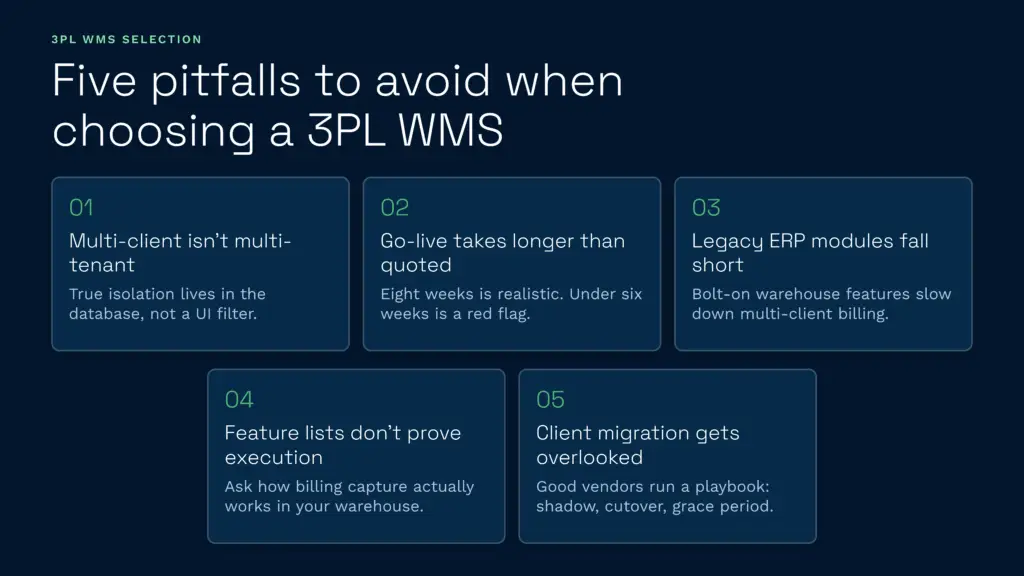
1. Confusing “multi-client” with “multi-tenant”. Some vendors add a “client code” field to a single-tenant system and call it multi-client. This is a feature, not architecture. True multi-tenancy means data isolation at the database level, not just UI filtering. Test this rigorously in a demo.
2. Underestimating implementation effort. A vendor quoting “four weeks to go-live” is setting you up. Plan for discovery (two weeks), configuration (three weeks), data migration (two weeks), testing (two weeks), training (one week), and ramp-up (two weeks). Eight weeks is realistic. Less than six weeks should raise red flags, they’re either skipping critical steps or oversimplifying your operations.
3. Assuming legacy ERP modules are good enough. Sage 200 WMS, Dynamics NAV Warehouse, SAP EWM, these add warehouse features to accounting systems. They’re not terrible for basic inventory, but for 3PL work they’re hamstrung: multi-client handling is slow, billing automation is weak, and vendor roadmaps don’t prioritise 3PL needs because they’re buried inside a general ERP suite. A purpose-built WMS moves faster and costs less than retrofitting an ERP module.
4. Choosing based on feature lists alone. Spreadsheet vendors will claim “wave picking”, “client portal”, “billing automation”, all true, all worthless without real-time execution. A system that lets you configure billing is useless if it doesn’t capture billable events automatically. Ask “how does this actually work in my warehouse?” not just “what does it claim to do?”
5. Overlooking client migration. If you’re switching from one WMS to another, your clients see the impact. If the new system’s portal is clunky or reporting is slower, they notice and they complain. A good vendor has a migration playbook: shadow running with the new system running in parallel, cutover support, and a grace period with extra handholding. If they’re casual about migration, they don’t understand 3PL.
Why Purpose-Built 3PL WMS Beats Retrofitted Solutions
A generic WMS treats all warehouses the same. Receiving goes to one zone, putaway to another, picking from a third. Works fine when you’re managing one client’s inventory flowing through one facility.
3PL warehouses are different. Client A’s inbound might arrive at dock 1 while Client B’s arrives at dock 3. Client A’s picks might need temperature control while Client B’s are ambient. Billing rules are different per client, sometimes per product within a client. Reporting needs to isolate client-specific metrics, why did Client A’s stock count spike?—while also showing consolidated warehouse KPIs.
A generic WMS shoehorned into this work creates friction. You work around its limitations with manual processes, spreadsheets, and workarounds. A purpose-built 3PL WMS has these complexities wired in. It doesn’t ask “how do I add multi-client to my single-client system?” It asks “what does a 3PL actually need?” and builds from there.
The result: faster implementation, fewer customisations, lower total cost of ownership, and a system that actually fits your business instead of forcing you to fit it.
Sprechen Sie mit einem Lagerfachmann
If you’re evaluating your options and want to see how a purpose-built WMS works in practice, Clarus is worth a conversation. We work with 3PLs and distributors across the UK to implement Beste Lagerverwaltungssoftware that fits the way you operate, not the other way around.
Kontaktieren Sie unser Team um Ihre Anforderungen zu besprechen.